

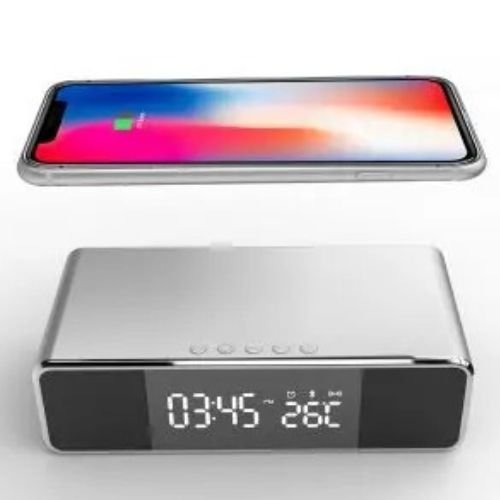

The YGON MSL-6019Q is a multifunctional desktop device that combines dual Bluetooth speakers, a 5W wireless charging pad, and a digital alarm clock with temperature display.
Key Settings & Instructions
Time & Date Setting:
Press the Menu button to cycle through modes: Time, Date, Alarm 1 (A1), Alarm 2 (A2), and Alarm 3 (A3).
When the desired mode is on the screen, long press the Menu button to enter the setting state (digits will flash).
Use the Previous (Up) or Next (Down) buttons to adjust the values. Long press these buttons to change digits rapidly.
The clock supports both 12-hour and 24-hour formats; in 12-hour mode, an “AM/PM” indicator will appear automatically.
Bluetooth Speaker Connection:
Long press the Bluetooth button (looks like a speaker or “BT”) to enter standby mode; a flashing icon will appear on the display.
On your mobile device, search for “BT Speaker” and select it to pair.
Once connected, the icon will stay bright. You can then use the Previous/Next buttons for track switching and the Pause/Play button for music control.
Wireless Charging:
Place your Qi-certified device directly on the top surface.
Charging begins automatically, and a wireless charging symbol will appear on the top left of the LED display.
Temperature Display:
The clock automatically detects temperature (range: 0°C to 50°C).
To switch between Celsius (°C) and Fahrenheit (°F), long press the Down button for 2 seconds.
Power-Saving Mode:
Press the Down button to toggle the power-saving function.
“ON:Sd” means the display will turn off after 10 seconds (wake it up by clapping or touching the device).
“Sd” means the display will stay on continuously.
Technical Specifications
Input: Type-C 5V/3A.
Wireless Output: 5V/1A (5W).
USB Output: 5V/1A (for wired charging of another device).
Do you need help with setting a specific alarm time or troubleshooting the Bluetooth connection?



Reviews
There are no reviews yet.