

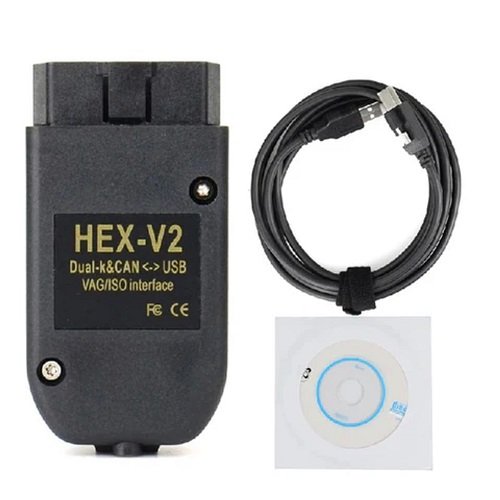
The HEX-V2 VAG COM VCDS USB Interface is a professional-grade diagnostic tool designed specifically for Volkswagen Group vehicles, including VW, Audi, Skoda, Seat, and Bentley. The “Unlimited VIN” version is the unrestricted professional variant, allowing you to perform advanced diagnostics, coding, and adaptations on an unlimited number of vehicles without the 3-VIN or 10-VIN limits found on enthusiast models.
Key Features and Capabilities
Broad Vehicle Support: Compatible with VAG models from 1995 to the current model year.
Advanced Diagnostics: Offers factory-level access to all control modules to read/clear fault codes, view real-time live data, and perform output tests.
Coding & Adaptations: Enables “Long Coding” to unlock hidden features (e.g., remote window operation), reset service intervals, and code new batteries.
High-Speed Hardware: Features an improved microcontroller and detachable USB cable, offering faster operation on CAN-based models compared to older HEX-USB+CAN interfaces.
Protocol Compatibility: Supports modern CAN, UDS, and ODX protocols as well as older K-line systems.
Critical Purchasing Considerations
When looking for this interface, you will encounter two distinct types of products:
Genuine Ross-Tech HEX-V2:
Price: Typically between ৳24,500 ($199) for limited VINs and over ৳65,000 ($500+) for the Professional Unlimited VIN version.
Benefits: Includes official Ross-Tech VCDS software license, free lifetime software updates, and access to technical support forums.
Third-Party/Aftermarket Interfaces:
Price: Often found on platforms like AliExpress or Daraz for ৳4,000 to ৳8,000 ($15–$70).
Risks: These are frequently “clones” that may not support official software updates. Updating the software on a clone can often “brick” (permanently disable) the hardware.
Quick Setup Guide
Install Software: Download the latest VCDS software from Ross-Tech (if using a genuine cable) and install it on a Windows PC before plugging in the hardware.
Connect: Plug the interface into your car’s OBD-II port and then into your laptop’s USB port.
Test Connection: Open VCDS, go to [Options], and click [Test] to ensure the software recognizes the interface.
Register: Genuine units must be registered within 10 uses via the VCDS configuration utility to maintain full functionality.
Would you like to know the specific coding steps for a certain feature, like disabling the start/stop system or resetting a service light?
The HEX-V2 VAG COM VCDS USB Interface is a professional-grade diagnostic tool designed specifically for Volkswagen Group vehicles, including VW, Audi, Skoda, Seat, and Bentley. The “Unlimited VIN” version is the unrestricted professional variant, allowing you to perform advanced diagnostics, coding, and adaptations on an unlimited number of vehicles without the 3-VIN or 10-VIN limits found on enthusiast models.
Key Features and Capabilities
Broad Vehicle Support: Compatible with VAG models from 1995 to the current model year.
Advanced Diagnostics: Offers factory-level access to all control modules to read/clear fault codes, view real-time live data, and perform output tests.
Coding & Adaptations: Enables “Long Coding” to unlock hidden features (e.g., remote window operation), reset service intervals, and code new batteries.
High-Speed Hardware: Features an improved microcontroller and detachable USB cable, offering faster operation on CAN-based models compared to older HEX-USB+CAN interfaces.
Protocol Compatibility: Supports modern CAN, UDS, and ODX protocols as well as older K-line systems.
Critical Purchasing Considerations
When looking for this interface, you will encounter two distinct types of products:
Genuine Ross-Tech HEX-V2:
Price: Typically between ৳24,500 ($199) for limited VINs and over ৳65,000 ($500+) for the Professional Unlimited VIN version.
Benefits: Includes official Ross-Tech VCDS software license, free lifetime software updates, and access to technical support forums.
Third-Party/Aftermarket Interfaces:
Risks: These are frequently “clones” that may not support official software updates. Updating the software on a clone can often “brick” (permanently disable) the hardware.
Quick Setup Guide
Install Software: Download the latest VCDS software from Ross-Tech (if using a genuine cable) and install it on a Windows PC before plugging in the hardware.
Connect: Plug the interface into your car’s OBD-II port and then into your laptop’s USB port.
Test Connection: Open VCDS, go to [Options], and click [Test] to ensure the software recognizes the interface.
Register: Genuine units must be registered within 10 uses via the VCDS configuration utility to maintain full functionality.
Would you like to know the specific coding steps for a certain feature, like disabling the start/stop system or resetting a service light?
You can purchase the Hex-V2 VCDS Interface (Unlimited VINs) from Jabedul Dewan Trading L.L.C, a prominent seller based in Dubai, United Arab Emirates. They are known for providing global remote support for software installation and activation.
Purchase Options
Amazon.ae Store: You can buy directly from the Jabedul Dewan Trading L.L.C Amazon Storefront, which lists various diagnostic tools including HEX V2 cables and ODIS interfaces.
Physical Location: Visit their office in Dubai for in-person support or local pickup:
Address: Al Fahidi Souk, 2, 33c street, 1st Floor, Office F98, Bur Dubai.
Operating Hours: 9:00 AM – 11:00 PM.
Key Product Features
Vehicle Support: Compatible with Volkswagen, Audi, Skoda, and Seat models from 1996 to the current year.
Unlimited VINs: This professional version allows you to diagnose an unlimited number of vehicles without restrictions.
Remote Assistance: The seller offers worldwide remote support for software setup, which is particularly helpful for activation and troubleshooting.
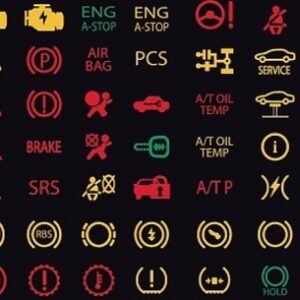
Software Functions: Enables factory-level diagnostics, including reading/clearing fault codes (DTCs), viewing live data, and performing module coding or adaptations.
Technical Requirements
To use the interface, you will need a laptop or PC with the following:
Operating System: Windows 7, 8, 10, or 11 (Windows RT is not supported).
Hardware: 1.5 GHz dual-core processor, 1 GB RAM, and an available USB 2.0 or higher port.
Would you like to know more about the installation process or the specific diagnostic functions supported for your car model?

Reviews
There are no reviews yet.