

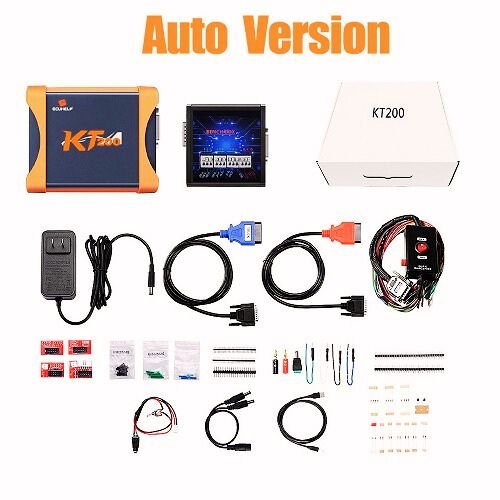


The KT200 ECU Programmer is a professional-grade automotive tool designed for comprehensive ECU and TCU management, including reading, writing, cloning, and chip tuning across a wide variety of vehicle types.
Key Features & Capabilities
Broad Vehicle Support: Works with cars, trucks, motorcycles, tractors, and boats.
Multi-Protocol Compatibility: Supports OBD, Bench, Boot Mode, BDM, and JTAG systems.
ECU & TCU Cloning: Specifically capable of full cloning and coding for both Engine Control Units (ECUs) and Transmission Control Units (TCUs).
Customization Services: Used for Stage 1/2/3 chip tuning, DTC removal, EGR/DPF removal, IMMO OFF, and speed limit adjustments.
Data Integrity: Provides automatic checksum calculation for many protocols to ensure safe data writing.
Full System Access: Allows reading and writing of both Micro and EEPROM data.
Versions & Pricing
The KT200 is available in several configurations, with prices typically ranging from $450 to $1,300 depending on the licenses and hardware included.
Auto Version: Generally supports basic car and truck protocols via OBD and Bench mode.
Full Version: Includes 10 licenses covering all vehicle types (Car, Truck, Tractor, Boat, Motorbike) and all communication modes.
KT200 II (Gen2): The latest hardware version (2024+) with optimized server connections and expanded protocol support for newer EDC17 and TCU models.
Offline Workstation: An optional USB dongle that allows the software to work without a stable internet connection.
Technical Requirements
Operating System: Compatible with Windows 7, 8, 10, and 11.
Recommended Hardware: CPU > 2.5 GHz (Intel i5/i7) and at least 8GB of RAM for the newest software versions.
Online Operation: The standard version requires a stable internet connection to access the manufacturer’s server for authorization during use.
For further details on specific vehicle lists, you can check the ECUHELP KT200 Official Shop or verify authentic hardware at VXDAS.
Are you looking to use the KT200 for a specific vehicle brand, or do you need help setting up the offline workstation?



Reviews
There are no reviews yet.