


BRP Explorer Software – ECU Diagnostics & Service via J2534 for BRP Vehicles
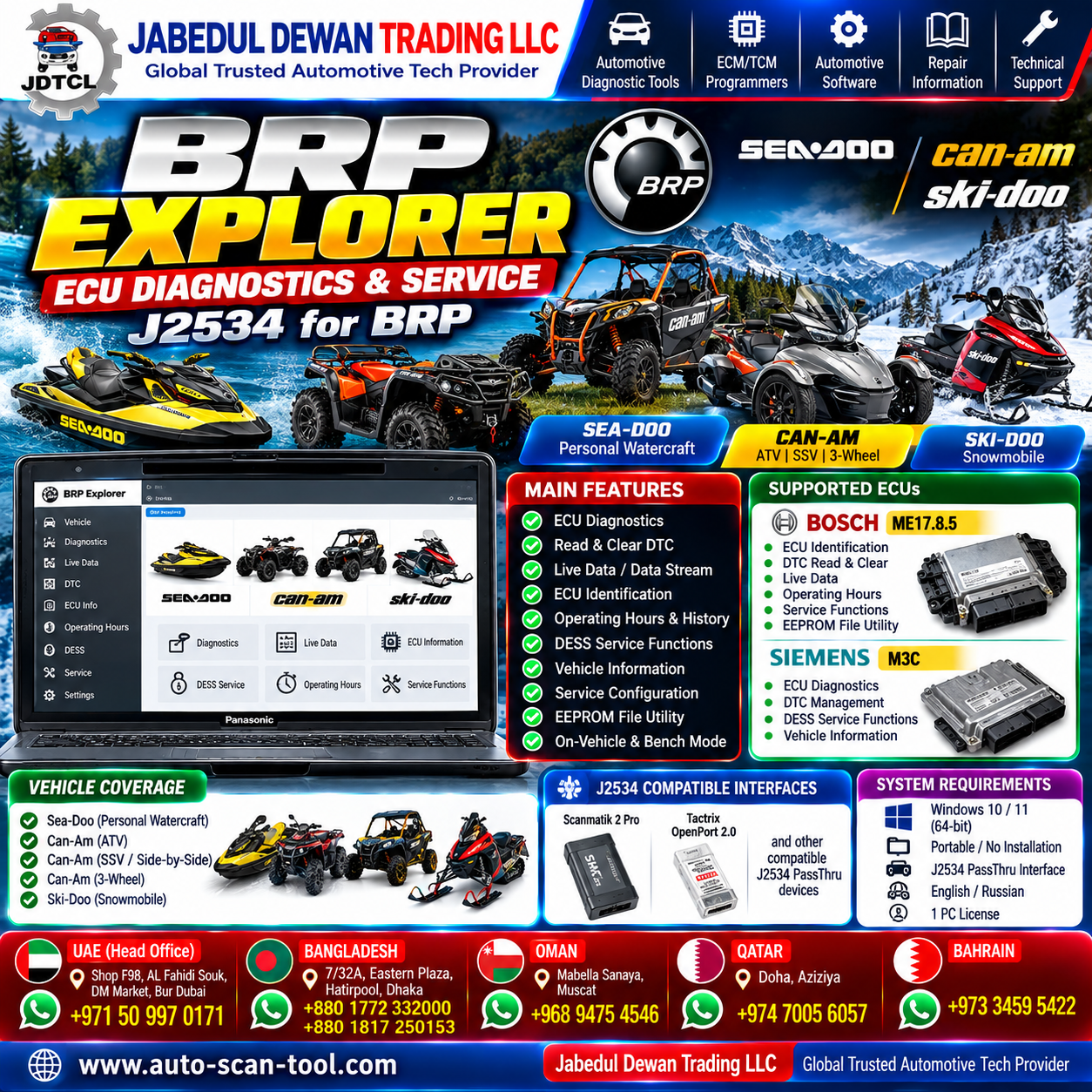
BRP Explorer is specialized professional diagnostic and service software designed for supported BRP vehicles and ECUs. It works through a compatible J2534 PassThru interface and supports both direct vehicle diagnostics and bench-connected ECU service workflows.
The software is designed for technicians working with BRP applications including Sea-Doo, Can-Am and Ski-Doo, with current documented ECU support including Bosch ME17.8.5 and Siemens M3C. jdtl
Supported BRP Applications
BRP Explorer is intended for supported applications across the BRP family, including:
- Sea-Doo personal watercraft
- Can-Am ATV
- Can-Am SSV / Side-by-Side
- Can-Am three-wheel vehicles
- Ski-Doo snowmobiles
Exact functionality depends on the vehicle, ECU type, ECU software version and connection method. ECU selection should be confirmed from the ECU identification/label rather than relying only on vehicle model year. jdtc
Supported ECUs
Bosch ME17.8.5
BRP Explorer provides extensive diagnostic, identification, live-data and service-related functionality for supported Bosch ME17.8.5 applications.
Siemens M3C
Supported functions include ECU diagnostics and DTC management, along with applicable DESS-related service functionality. jdtl
Professional ECU Diagnostics
BRP Explorer provides essential ECU diagnostic functions for professional workshops.
Depending on the supported ECU, technicians can access:
- ECU identification information
- Read Diagnostic Trouble Codes (DTC)
- Clear stored DTCs
- View DTC status and descriptions
- Real-time engine parameters
- Vehicle and ECU operating information
- Operating history
- Engine runtime information
This makes BRP Explorer useful for systematic fault diagnosis rather than relying only on basic generic OBD information. jdtl
Live Data / Data Stream
BRP Explorer can display important real-time operating parameters on supported applications, including:
Engine Data
- Engine RPM
- Intake temperature
- Engine temperature
- Exhaust temperature
- Intake air pressure
- Battery voltage
Throttle Data
- Throttle opening
- Accelerator/throttle position information
Operating Status
- Key-present status
- Valid-key status
- Idle status
- Limp-home status
- Check Engine status
Available parameters depend on the ECU and application. jdtl
ECU Identification
For supported Bosch ME17.8.5 ECUs, BRP Explorer can retrieve detailed identification information such as:
- Vehicle VIN
- Engine serial number
- Vehicle model number
- Customer information
- Rotax part/hardware information
- Firmware information
- Delivery-related information where available
This can help technicians verify that they are working with the correct ECU and vehicle configuration before performing service operations.
Operating Hours & History
BRP Explorer also provides operating-history information on supported Bosch ME17.8.5 ECUs.
This can include separate vehicle/engine operating-hour information and operating history across different conditions or RPM ranges. Such information can be useful during diagnostics, servicing and condition assessment. jdtl
DESS Service Functions
BRP Explorer includes DESS-related service functionality for supported applications. Documentation for the software describes functions for viewing and managing supported DESS configurations and authorized keys. ECUTools
These security-related functions should only be used by professional technicians on vehicles they own or are explicitly authorized to service.
Identification & Service Configuration
On supported Bosch ME17.8.5 applications, BRP Explorer includes tools for working with certain ECU identification fields, including:
- VIN
- Customer/owner information
- Vehicle model number
- Engine serial number
These functions are intended for legitimate ECU replacement, repair and authorized service workflows.
J2534 PassThru Support
One of the main advantages of BRP Explorer is its use of a J2534 PassThru interface.
Documented compatible examples include:
- Scanmatik 2 Pro
- Tactrix OpenPort 2.0
- Other compatible genuine J2534 PassThru devices with the appropriate manufacturer drivers
This allows technicians who already own compatible J2534 hardware to integrate BRP Explorer into their diagnostic setup without requiring a dedicated interface for every supported operation. jdtl
Vehicle & Bench Mode
BRP Explorer is designed for two professional working environments:
On-Vehicle Diagnostics — Connect through the vehicle diagnostic system using a compatible J2534 interface.
Bench Work — Work with supported ECUs outside the vehicle when the correct professional bench setup is available.
This flexibility makes the software suitable for diagnostic workshops as well as specialist ECU service environments. jdtl
EEPROM File Utility
For supported Bosch ME17.8.5 applications, the software also contains an EEPROM file utility.
An important limitation is that BRP Explorer does not directly read or write EEPROM through J2534. The EEPROM file must first be obtained using appropriate external programming equipment. The software’s EEPROM functionality works with the previously read file and includes automatic checksum recalculation when saving supported modifications. jdtl
System Requirements
Operating System: Windows 10 / Windows 11
Software Format: Portable executable / EXE
Installation: No conventional installation required according to current product documentation
Interface: Compatible J2534 PassThru adapter with its manufacturer driver installed
Languages: English / Russian are documented on current listings. jdtl
License Information
Current product documentation specifies:
License: 1 PC / 1 Activation
The license is hardware-bound to the computer. Current vendor documentation states that transfer or reactivation to another computer is not provided, including situations involving computer failure or replacement of major hardware components. Customers should therefore confirm licensing conditions before activation. jdtl
Who Is BRP Explorer For?
BRP Explorer is suitable for:
- BRP repair workshops
- Sea-Doo technicians
- Can-Am service specialists
- Ski-Doo technicians
- Powersports diagnostic workshops
- Automotive/motorsport electronics specialists
- ECU repair professionals
- Professional diagnostic technicians
Why Choose BRP Explorer?
BRP Explorer combines J2534 connectivity, ECU identification, DTC diagnostics, live data, operating history and specialized BRP service functionality in one professional software environment.
For workshops already equipped with compatible J2534 hardware, it can provide a practical specialized solution for supported BRP ECU diagnostic and service work.
Important Compatibility Notice
Compatibility and available functions can vary according to the exact BRP vehicle, ECU type, hardware number, software version and connection method.
Currently documented ECU support includes Bosch ME17.8.5 and Siemens M3C. Always verify the ECU identification and current software compatibility before purchase or performing service operations. JDTL
Security-related functions should only be used for lawful, authorized repair and service.
Jabedul Dewan Trading LLC
Global Trusted Automotive Tech Provider
Automotive Diagnostic Tools • ECM/TCM Programmers • Automotive Software • ECU Solutions • Technical Support
Technical Support / WhatsApp: +971 50 997 0171



Reviews
There are no reviews yet.