

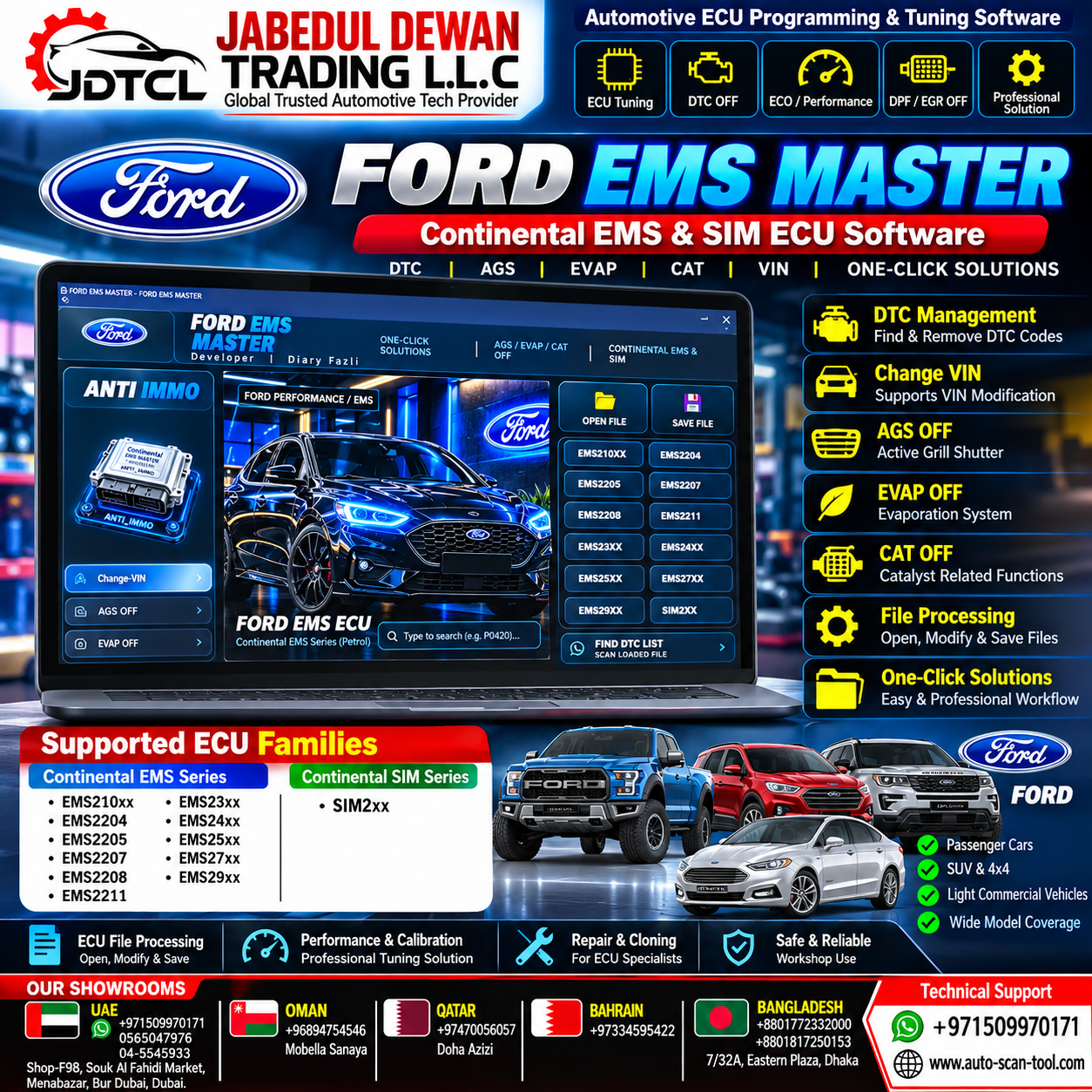
FORD EMS MASTER – Continental EMS & SIM ECU Calibration & Binary Editor Software
Professional Ford Continental EMS & SIM ECU File Processing, DTC Management, VIN Editing & Calibration Software
Take your professional Ford ECU diagnostic, repair and calibration workflow to the next level with FORD EMS MASTER.
FORD EMS MASTER is an advanced Windows-based binary editing and ECU file-processing solution designed for automotive electronic engineers, ECU technicians, calibrators and professional workshops working with supported Continental EMS and Siemens/Continental SIM ECU families.
The software combines intelligent binary pattern recognition, individual DTC management, VIN editing and supported calibration functions in one streamlined desktop application.
Key Features & Capabilities
Intelligent Binary Pattern Recognition
The advanced multi-pattern search engine analyzes supported ECU binary files and identifies relevant data structures across different software revisions.
This helps technicians process compatible ECU files efficiently without relying solely on fixed addresses.
Individual DTC Management
The integrated DTC management interface allows technicians to:
- Search supported DTC codes
- Locate DTC structures inside the ECU file
- Review detected DTC entries
- Select individual DTCs
- Process supported DTC-related calibration data
- Save the modified ECU file
This provides greater control than applying a single global modification to the entire file.
VIN Editing & Alignment
FORD EMS MASTER includes an integrated VIN processing function capable of locating supported 17-character VIN data within compatible ECU files.
Useful for legitimate professional applications such as:
- ECU replacement
- ECU cloning and repair
- Module matching
- Vehicle restoration
- Replacement ECU configuration
VIN modifications should only be performed where legally permitted and with the correct vehicle identification information.
Supported Calibration Functions
Depending on the ECU family and software version, FORD EMS MASTER can provide supported file-processing functions including:
CHANGE VIN
Locate and modify supported VIN data within compatible ECU firmware.
AGS Calibration
File-processing functions related to supported Active Grille Shutter (AGS) configurations.
EVAP Calibration
Processing of supported EVAP-related calibration and diagnostic structures.
EGR Calibration
Processing of supported Exhaust Gas Recirculation calibration structures where available.
CAT-Related Calibration
Processing of supported catalyst-related diagnostic and calibration structures for lawful repair, development, testing or permitted applications.
Availability varies according to the exact ECU hardware, software version and calibration.
Professional File Workflow
FORD EMS MASTER provides a straightforward ECU file workflow:
Open ECU File → Analyze File → Select Function → Process Calibration → Save Modified File
Additional workflow features include:
- BIN file loading
- ECU data analysis
- DTC search
- Individual DTC selection
- VIN processing
- Calibration processing
- Modified-file saving
- Automatic output-file naming
- Processing status notifications
- File-loading protection
- Application-state reset when loading another ECU file
Supported Continental EMS ECU Families
FORD EMS MASTER is designed for compatible Ford Continental EMS applications, including supported variants within:
- Continental EMS2101
- Continental EMS2102
- Continental EMS2103
- Continental EMS2204
- Continental EMS2205
- Continental EMS2207
- Continental EMS2208
- Continental EMS2211
- Continental EMS23xx Series
- Continental EMS24xx Series
- Continental EMS25xx Series
- Continental EMS27xx Series
- Continental EMS29xx Series
Supported Siemens / Continental SIM Families
Compatible applications may include supported variants of:
- SIM22
- SIM24
- SIM28
- SIM29
- SIM200
- SIM210
- Other supported SIM2xx-family ECUs
Exact compatibility depends on the ECU part number, hardware version, software version and firmware file.
Designed for Professional Ford ECU Work
FORD EMS MASTER can be useful for professional:
- ECU repair workshops
- Automotive electronics specialists
- ECU calibration technicians
- Diagnostic specialists
- ECU programmers
- Automotive engineers
- ECU replacement and cloning services
- Vehicle restoration workshops
System Requirements
Operating System: Windows 10 / Windows 11
Platform: Windows desktop application
License: Single-PC / HWID-based activation, depending on supplied license
Operation: Local ECU file processing
Internet: Some licensing or activation processes may require internet access
Important Compatibility Notice
ECU compatibility should always be confirmed before purchasing or processing a vehicle.
Please provide the following where possible:
- Vehicle make and model
- Model year
- ECU manufacturer
- ECU model/family
- ECU part number
- Hardware number
- Software number
- Original ECU read/BIN information
Not every listed function is available for every ECU or software revision.
Always create and securely store the original ECU backup before modifying a file. Use a stable power supply during ECU programming and never interrupt an ECU writing procedure.
Emission-related calibration functions should only be used where legally permitted, such as appropriate repair, development, testing, motorsport or off-road applications.
JABEDUL DEWAN TRADING LLC – Worldwide Technical Support
Global Trusted Automotive Tech Provider
We provide professional automotive diagnostic, ECU/TCU programming and software configuration support for workshops and automotive technicians worldwide.
WhatsApp / Technical Support: +971 50 997 0171
Website: auto-scan-tool.com
Service Coverage: UAE • Bangladesh • Oman • Qatar • Bahrain • Worldwide

Reviews
There are no reviews yet.