

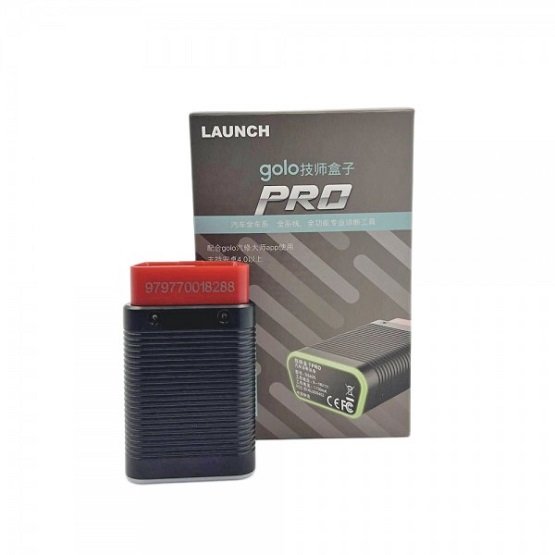
To launch the Launch Golo Pro 4.0 with Diagzone Pro software, you need to follow a specific activation process that links your hardware’s serial number to the third-party Diagzone platform.
Step-by-Step Launch Guide
Obtain Your Serial Number (S/N)
Find the unique serial number on the back of your Golo Pro dongle or on the activation paper provided with the device.
Download and Install the App
Download the Diagzone Pro V2 APK (usually available via the official Diagzone website or from your software vendor) and install it on an Android device.
Request Activation
Provide your S/N to a Diagzone reseller to create an account.
Most vendors will first provide a free EOBD test version to ensure the hardware and software are communicating correctly before you purchase the full license.
Pair the Hardware
Plug the Golo Pro into your car’s OBD2 port and turn the ignition on.
Enable Bluetooth on your Android device and pair it with the dongle through the Diagzone app settings.
Download Vehicle Software
Once activated, log in to the app and go to the “Software Update” section to download the specific car brand packages included in your subscription (2-year full activation).
Key Features of this Setup
Full System Diagnosis: Supports reading/clearing codes and live data for all vehicle modules (ECU, ABS, SRS, etc.).
Service Resets: Includes 38+ common maintenance functions such as Oil Reset, SAS Reset, Brake Reset, and DPF Regeneration.
Advanced Coding: Supports ECU Coding and bidirectional active tests, allowing you to trigger components like injectors or fuel pumps for testing.
Note: Ensure your Golo Pro is an “Old Boot” version if required by your specific Diagzone activation, as some newer firmware versions may have restricted compatibility.
Would you like help finding a trusted vendor for the Diagzone Pro activation or a manual for specific car brand coding?
You can buy the Launch X431 Golo Pro 4.0 with Diagzone Pro software in Dubai from Jabedul Dewan Trading Co, LLC. This specialized automotive diagnostics supplier is a known seller for these specific tools and software configurations in the UAE.
Where to Buy: Jabedul Dewan Trading Co, LLC
Location: Nesto Hypermarket, Meena Bazaar – Shop F98 – 3 64 St – Bur Dubai – Al Fahidi – Dubai.
Contact Number: +971 50 997 0171.
Business Hours: Open daily from 9:00 AM to 11:00 PM.
Website: auto-scan-tool.com.
Product & Service Details
Item: Launch X431 Golo Pro 4.0 OBD2 Bluetooth Scanner bundled with Diagzone Pro Software.
Features: Includes full system diagnosis, ECU coding, and support for over 200 car brands.
Software Updates: Often sold with a 2-year update subscription for the Diagzone Pro software.
Online Presence: Jabedul Dewan Trading also operates as a merchant on Amazon.ae and Noon.com, where they list various automotive diagnostic tools.

Reviews
There are no reviews yet.