

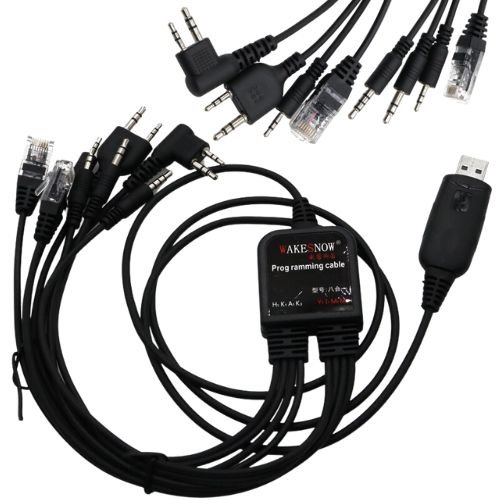
The USB Walkie Talkie Programming Cable is a multi-functional tool designed to connect your handheld radio to a PC for frequency and feature management. This cable typically uses a 2-pin “K-type” connector (3.5mm top pin, 2.5mm bottom pin) with an 11mm spacing, making it compatible with over 99% of K-head radio equipment.
Key Compatibility & Hardware
Supported Radio Brands: Baofeng (UV-5R, UV-82, BF-888s), Kenwood, TYT, Motorola, Yaesu, HYT, Wouxun, and Puxing.
Internal Chipsets: Most modern versions use the CH340 or C2102 chips, which are generally stable on Windows.
Operating Systems: Compatible with Windows 10, 8.1, 8, 7, and XP. It is typically not compatible with macOS or Linux.
Programming Setup Guide
To achieve “effortless programming,” follow these steps sourced from Baofeng’s setup guidelines:
Install Drivers: Insert the included CD or download the latest CH340/Prolific drivers from a trusted source like Miklor.
Connect Hardware: Plug the USB end into your PC and the 2-pin connector firmly into the radio’s MIC/SP jack. Ensure the plug is fully seated, as a loose fit is a common cause of connection errors.
Software Selection: While a CD is often included, many experts recommend using the free, open-source software CHIRP for a more user-friendly experience across multiple radio models.
Read and Write:
Turn the radio ON with a full battery.
In your software, select “Download From Radio” first to back up your current settings.
Modify your frequencies or settings, then select “Upload To Radio” to save changes.
Top Product Recommendations
8-in-1 Multi-function Cable: Best for users with a fleet of different radio brands (Motorola, Yaesu, Icom, etc.), as it includes multiple interchangeable connectors.
Original Baofeng CH340 Cable: A highly reliable, single-purpose cable for the UV-5R and UV-82 series that avoids the driver issues common with cheaper “cloned” chips.
Would you like help finding a specific CHIRP-compatible frequency list for your local area?
For those looking for a Walkie Talkie Programming Cable for models like the Baofeng UV5R and UV82 in the UAE, Jabedul Dewan Trading L.L.C. is a key local supplier. They specialize in automotive diagnostic tools and radio programming equipment.
Where to Buy in the UAE
You can purchase this cable directly from Jabedul Dewan Trading through their physical showroom or online platforms:
Physical Showroom: Located in the Al Fahidi Souk, 1st Floor, Office F98, Bur Dubai.
Online Marketplace: They operate a storefront on Amazon.ae, where they list various diagnostic and programming tools.
Direct Contact: You can reach them via WhatsApp at +971 50 997 0171 for inquiries or direct orders.
Product Features & Compatibility
The multi-functional programming cable typically includes the following features:
Broad Compatibility: Works with Baofeng (UV-5R, UV-82, BF-888S), Kenwood, TYT, Yaesu, and HYT radios.
Plug Type: Features a standard two-pin K-head connector (3.5mm and 2.5mm jacks).
Software Included: Often comes with a CD containing driver and programming software to manage frequencies and settings from a PC.
Operating Systems: Compatible with most Windows versions, including Windows 10.
Other Trusted UAE Suppliers
If Jabedul Dewan is out of stock, these authorized distributors and retailers also stock Baofeng accessories:
Terrabyt: An authorized Baofeng supplier in Dubai.
AWPRO: Authorized distributor located in Dubai, offering the Baofeng UV-82 and related gear.
Would you like the direct WhatsApp link for Jabedul Dewan Trading to check their current stock of the 8-in-1 cable?
Be the first to review “Walkie Talkie Programming Cable with CD Baofeng UV5R UV82 for Tyt Kenwood Motorola Yaesu Hyt Radio,Effortless Programming with the Multi-functional USB Walkie Talkie Programming Cable for Baofeng, Tyt, Kenwood, and more”
Related products


Reviews
There are no reviews yet.