


Support Online Programming
ODIS 25.0.1 + ODIS Engineering 19.0.0
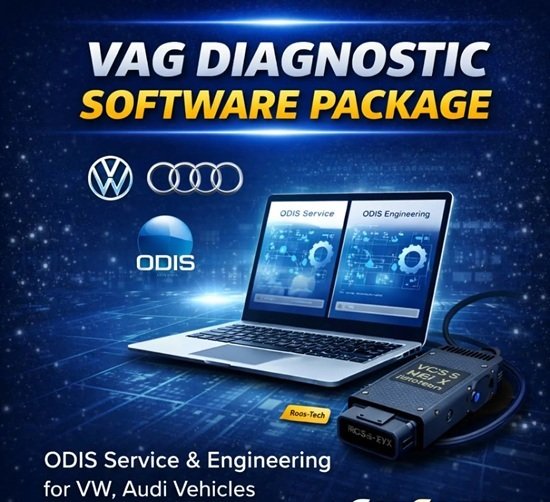
ODIS (Offboard Diagnostic Information System) is the official dealer-level diagnostic and programming software used by the Volkswagen Group (VAG) for its brands, including Volkswagen, Audi, SEAT, Škoda, Bentley, and Lamborghini.
The “Online Installation Service” is a professional support offering where technicians or engineers remotely set up and activate the complex ODIS software on your laptop via tools like TeamViewer or AnyDesk.
Key Features of ODIS Software
Comprehensive Diagnostics: Full access to all electronic systems (engine, transmission, ABS, airbags, etc.) to read and clear fault codes.
Guided Fault Finding: Uses manufacturer protocols to walk technicians step-by-step through repairs based on detected error codes.
Advanced Programming & Coding: Enables ECU flashing, module programming, key coding, and the activation of hidden features (e.g., adaptive cruise control or lane assist).
Maintenance Functions: Performs resets for service lights, battery registration, steering angle calibration, and DPF regeneration.
Technical Data: Integrated access to circuit diagrams, repair manuals, and official Technical Service Bulletins (TSBs).
How the Online Installation Service Works
Due to the high complexity of ODIS (which can require 60GB–150GB of disk space and specific Windows configurations), many users opt for remote installation services:
Remote Connection: An engineering team connects to your Windows 10/11 laptop using remote desktop software.
Software Setup: They handle the multi-step installation of ODIS Service (ODIS-S) or ODIS Engineering (ODIS-E) and required drivers.
Activation: The service includes activating the software license and, in some cases, setting up an online “Geko” account for server-based programming (like immobilizer or component protection removal).
Hardware Sync: They ensure your diagnostic interface (such as a VAS 6154 or VAS 5054A) is correctly recognized and communicating with the software.
Hardware & System Requirements
To use this service, your hardware must generally meet these standards:
OS: Windows 10 Pro or Windows 11 Pro (64-bit).
Hardware: A compatible VCI (Vehicle Communication Interface) such as the VAS 6154A VNCI 6154A, Topdon Rlink X7 or VCX SE.
Storage: At least 100GB–150GB of free SSD space is highly recommended.
Internet: A stable connection is required for both the remote installation and any online coding functions.
Do you have a specific VCI tool (like the VAS 6154) ready, or are you looking for a full hardware-software package?
Full VAG diagnostic software with ODIS-S, ODIS Engineer, ETKA, and ElsaWin;
VAG diagnostic software information
VAG diagnostic software suite includes the following software:
ODIS-S Software Version V7.2.1 for VAS5054 and newest ODIS-S Software Version V25.0.1
ODIS-Engineer Software Version 12.2.0 for VAS5054 and newest ODIS-Engineer Software Version 19.0.0
ETKA 8.3: data updated to 2022
Elsa win 6.0: support VW, Audi, data updated to 2017
Datenflash 05-2026
ODIS Engineer Software Version
VAG ODIS Engineer is an engineer’s programming software used for VAG vehicles. The latest updated version of ODIS has a 4G capacity and multi-language support. ODIS- E supports Volkswagen, Volkswagen Nutzfahrzeuge, Audi, Skoda, Seat, MAN, Lamborghini, Bentley, and Bugatti models.
Odis Engineer version 12.2.0 can support models until 2021
VAG Odis Engineer version 19.0.0 can support models until 2025
VAG ODIS E programming has the following functions:
Automatically recognize the vehicle model.
Read errors, clear errors.
Displays current vehicle parameters.
Activation and testing of electronic systems actuators.
Basic settings: setting steering angle, injector code, resetting maintenance lights, relearning throttle position
Offline install vehicle control systems.
Guide the repair procedure based on the error code step by step.
Integrate lookup circuit diagram, and location details on the software.
ODIS software supports vehicle models up to 2023 of brands such as Volkswagen, Volkswagen Nutzfahrzeuge, Audi, Skoda, Seat, MAN, Lamborghini, Bentley, and Bugatti.
ODIS SERVICE Software
VAG diagnostic ODIS Service software is specialized diagnostic software that can be used offline, the latest version is version 7.2 which can be used in multiple languages. ODIS is specialized diagnostic software for Audi, Volkswagen, Bentley, Skoda, Seat, MAN, Lamborghini, and Bugatti. With specialized software ODIS, technicians can accurately diagnose damage symptoms, and program and in-depth installation of the entire vehicle system.
Odis Service version 7.2.1 can support models until 2021
VAG diagnostic software version 25.0.1 can support models until 2025
VAG diagnostic software ODIS SERVICE software main functions:
Automatically recognize the vehicle model.
Read errors, clear errors.
Displays current vehicle parameters.
Activation and testing of electronic systems actuators.
Basic settings: setting steering angle, injector code, resetting maintenance lights, relearning throttle position.
Offline install vehicle control systems.
Guide the repair procedure based on the error code step by step.
Integrate lookup circuit diagram, and location details on the software.
You can watch a video:
ETKA 8.3 Software
VAG parts lookup ETKA is a specialized spare parts lookup software for Volkswagen Group vehicles, ETKA 8.3 Electronic Catalog contains complete information about spare parts and accessories for cars VAG (VW, Seat, Skoda, AUDI), including mini busses. The software is multilingual
ETKA 8.3 software functions: ETKA provides detailed information on genuine parts and accessories for four major models of Volkswagen Group, SEAT, Škoda, and Audi vehicles, including Commercial Vehicles Volkswagen Trade. In addition to information about auto parts, ETKA also allows to look up general catalog information such as (fasteners, light bulbs, batteries, etc.) and vehicle chemicals such as (oils, greases, and sealants) along with other information.
ELSAWIN Software
In the VAG diagnostic software package-install remotely, Elsawin software is updated to the new version and can be used in multi-languages of the specialized diagnostic part of VAG.
VAG repair and diagnostics software has the following main functions:
Maintenance procedures.
Step-by-step instructions for mounting/dismounting various components – including pictures and diagrams.
Fault diagnosis,
All service/repair information about all automotive systems:
With pictures and diagrams, mechanical parts (engine, body, brake, exhaust, clutch, transmission animation, etc) with pictures and diagrams.
Electrical part (engine, A/C, climate, radio, navigation, etc.)
Diagram and wiring.
To use these software, you must have a computer and a connected device. Here are some products you can refer to:
Which devices can work with the VAG diagnostic software package?
Currently on the market there are many diagnostic devices that can work with the software in our VAG package such as:
VAS5054A
Tabscan 6154+c
Autel
Launch x431
Topdon Rlink x7
VNCI 6154A
VAS6154A
Godiag
VCX SE
VNCI6154
CARDAG PLUS 3
and many other devices.
However, depending on each software, there will be different capabilities for connecting to different devices. Choosing which device depends on your need to use the software features you want.
Most Diagnostic Tools can diagnose vehicles of the VAG group including AUDI, SEAT, SKODA, BENTLEY…
Some of the basic functions of these devices are
Vehicle model identification
Automatically connect all electronic box systems
Read and clear error codes for all vehicle control systems
Displays current vehicle parameters
Check activation of the control system
Reset modes to default
Programming and setting operating values of various electronic control systems…
However, not all devices have the same functions, so you need to carefully learn about their features before choosing.
Note: This JDTCL software package only includes software and does not include equipment. If you want a combo package that includes both software and equipment, you can refer to VAG diagnostic software and tool.
Laptop for VW diagnostic software
To use the VW diagnostic software suite, you need a computer that fully meets the following factors
Laptop configuration:
Windows 10 Professional.
Core i5.
Ram: 8GB
SSD Hard Drive;
You can buy ODIS (Offboard Diagnostic Information System) VW/Audi Diagnostic Software Installation Services in Dubai directly from Jabedul Dewan Trading Co, LLC, located in Bur Dubai. They specialize in automotive diagnostic tools, ECU programming, and provide online installation and activation support.
Where to Buy: Jabedul Dewan Trading Co, LLC
Physical Location: Shop F98, Nesto Hypermarket, 3 64 St, Meena Bazaar, Al Fahidi, Bur Dubai, Dubai, UAE.
Contact Number: +971 50 997 0171.
Official Website: auto-scan-tool.com.
Online Marketplace: You can also find their products on the Jabedul Dewan Trading LLC Amazon.ae Store, where they list diagnostic scanners like the VNCI 6154A that include ODIS software installation and activation support.
Service Details
Software Packages: They offer various versions of ODIS Service (e.g., v7.2.1, v23.0.1) and ODIS Engineering, compatible with interfaces like VAS 6154 and VNCI 6154A.
Installation Support: Services typically include remote installation via TeamViewer or AnyDesk to ensure the software is correctly configured and activated on your laptop.
Compatibility: Supports diagnostics and programming for Volkswagen, Audi, Skoda, Seat, Bentley, and Lamborghini.
Would you like to know the laptop system requirements needed to run the latest version of ODIS software?

Reviews
There are no reviews yet.