

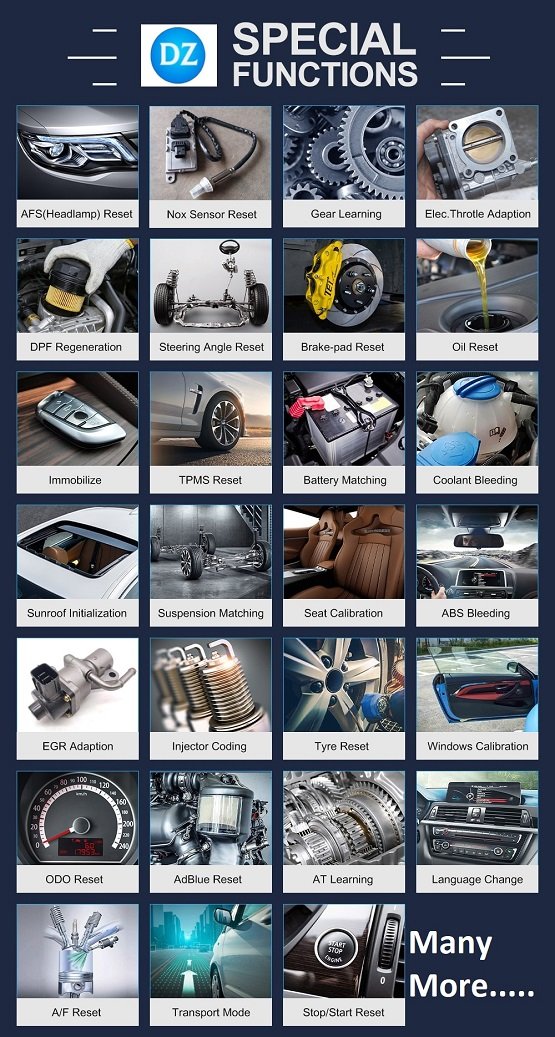

Vehicle diagnostic scanner special reset functions go beyond standard code reading, allowing you to directly intervene in a vehicle’s electronic control unit (ECU) to perform calibrations, initializations, and maintenance resets.
Common Special Reset Functions
These functions are typically found on semi-professional or professional-grade scanners like those from Autel, Launch, or Snap-on.
Oil Service Reset: Resets the oil life monitoring system and service reminders after a routine oil change.
Steering Angle Sensor (SAS) Calibration: Resets the steering wheel’s “zero” position. This is critical for stability and traction control systems.
Electronic Parking Brake (EPB) Reset: Puts the electronic brake into “service mode” to retract the calipers for pad replacement and then restores normal operation.
Throttle Body Adaptation: Re-aligns the throttle position values. Essential for a stable idle and smooth acceleration.
Battery Registration: Informs the ECU that a new battery has been installed so it can adjust the charging profile for optimal battery life.
DPF Regeneration: Forces a diesel particulate filter to burn off accumulated soot when natural driving conditions haven’t been sufficient.
ABS Bleeding: Activates the ABS pump and valves to cycle fluid and remove trapped air that manual bleeding cannot reach.
Injector Coding: Programs the unique operating characteristics of a new fuel injector into the ECU for accurate fuel delivery.
When to Use These Functions
Function Use Case / Trigger
SAS Calibration After wheel alignments, steering repairs, or suspension work.
Throttle Relearn After cleaning the throttle body or replacing the unit entirely.
EPB Reset Required during and after replacing rear brake pads on electronic systems.
Battery Registration Any time a new battery is installed in modern European or high-end vehicles.
DPF Regeneration When the DPF warning light is on or the engine enters “limp mode” due to soot buildup.
ABS Bleeding After replacing brake lines, the ABS module, or following a major brake fluid flush.
How to Perform a Special Reset
The general workflow is similar across most advanced OBD2 scanners:
Preparation: Ensure the vehicle is in a safe location. For functions like DPF regeneration, the engine must be at operating temperature and have sufficient fuel.
Connection: Plug the scanner into the OBD-II port (usually under the driver-side dashboard).
Power On: Turn the ignition to the ON (Accessory) position but do NOT start the engine unless the specific function (like DPF or ABS bleeding) requires it.
Menu Navigation: Select the “Service,” “Special Functions,” or “Maintenance” menu on your scanner.
Vehicle Selection: Choose your vehicle’s make, model, and year to ensure compatibility.
Follow Prompts: Carefully read the on-screen instructions. Some resets may require specific actions, such as keeping the steering wheel centered or keeping your foot off the pedals.
Verification: After the process finishes, cycle the ignition and check for remaining warning lights. A short test drive is often recommended to confirm the fix.
Are you looking for instructions on a specific vehicle model or a particular reset function like throttle relearn or battery registration?
Jabedul Dewan Trading Co, LLC is a prominent Dubai-based supplier specializing in automotive diagnostic scanners, ECU programming tools, and tuning software. They are an authorized dealer for major brands including Thinkcar, Jdiag, TopDiag, and Humzor.
Best-Sellers and Popular Products
Their inventory features a wide range of high-performance tools for both light and heavy-duty vehicles:
Thinkdiag 2: A highly popular full-system OBD2 code reader supporting CAN FD protocols and extensive reset functions.
PCMflash: A critical software complex for working with engine control units (ECU) and automatic transmissions (AT) across brands like Volkswagen, Toyota, and Ford.
Ecuhelp KT200 / KTFlash: Used extensively for ECM and TCM programming.
VNCI 6154A: A diagnostic scanner for VAG Group vehicles that supports online ODIS software installation and activation.
Micropod 2: Equipped with wiTech software for specialized Chrysler/Dodge/Jeep diagnostics.
Services and Training
The company provides a comprehensive ecosystem for automotive professionals:
Sales & Service: They offer worldwide sales through their Official Website and Amazon.ae storefront.
Support & Training: They are known for providing 24-hour technical support and often include installation and operating videos with their tools to facilitate “free training” or self-guided learning.
Specialized Software Services: They provide “Online Login Services” for dealer software like GM Techline Connect and specialized file services for ECU tuning (DTC off, IMMO off).
Business Details
Location: Nesto Hypermarket, Meena Bazaar – Shop F98, Bur Dubai, UAE.
Contact: +971 50 997 0171 (WhatsApp available).
Hours: Open daily from 9:00 AM to 11:00 PM.
Would you like to know more about a specific brand of scanner or details on their ECU tuning file services?


Reviews
There are no reviews yet.