

Ford FDRS Online Login Service – 1 Day, 6 Months & 1 Year
450.00 AED
Ford FDRS Online Login Service – 1 Day, 6 Months & 1 Year Details
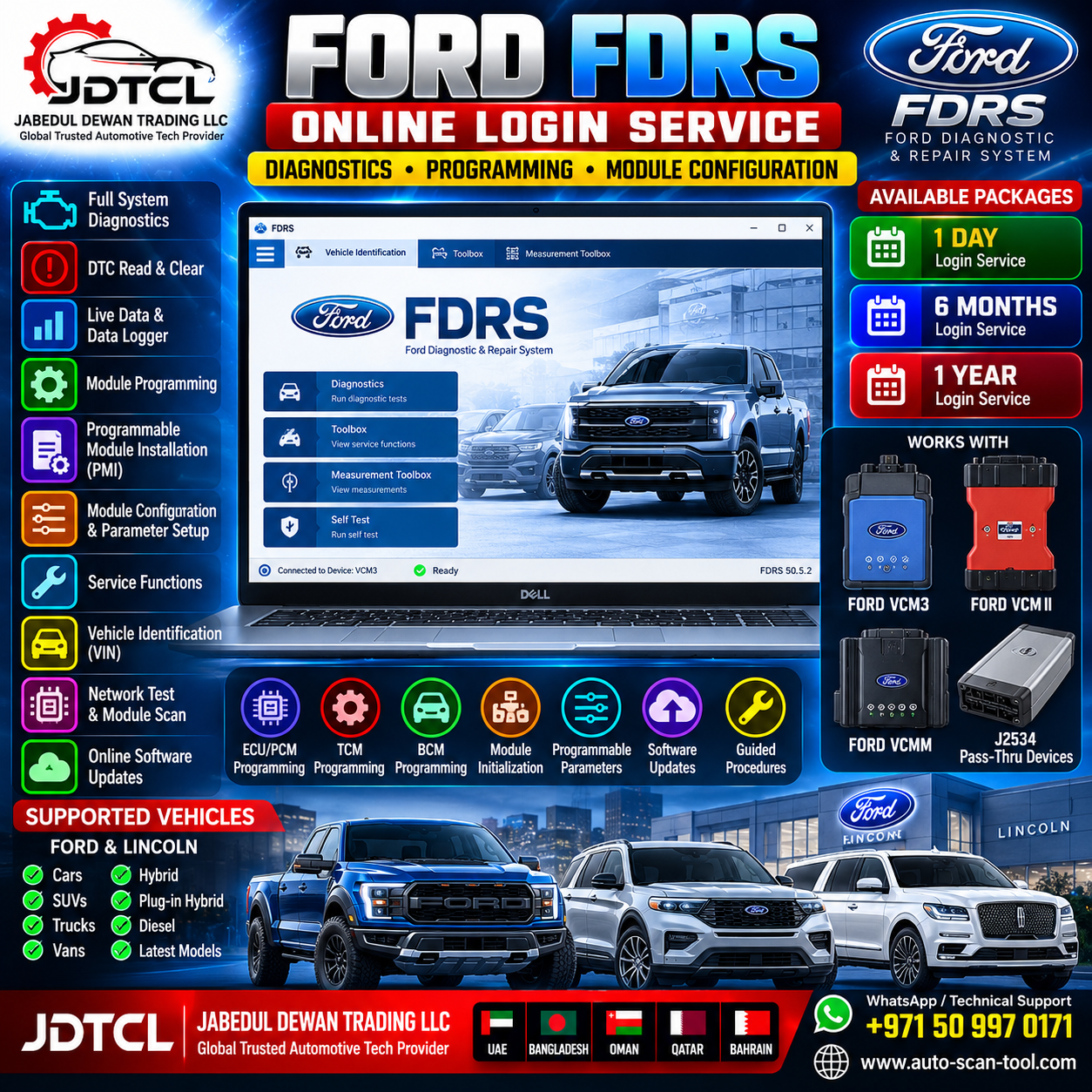
Ford FDRS Online Login Service provides professional workshops and automotive technicians with access for supported Ford diagnostic, service and module-programming operations using the Ford Diagnostic & Repair System (FDRS).
Available Service Durations
- 1 Day Price= 450UAE Dirham,
- 6 Months =1,200UAE Dirham.
- 1 Year =2050UAE Dirham.
FDRS is Ford’s newer-generation diagnostic platform for supported newer Ford and Lincoln vehicles. It uses an online/cloud-connected workflow so technicians can access current diagnostic and programming resources when connected to the Ford network.
Main FDRS Functions
Depending on vehicle, model year, module and account authorization, FDRS can support:
- Vehicle identification
- Full vehicle diagnostics
- DTC reading and clearing
- Network/module scanning
- Live data / Data Logger
- Module diagnostics
- Guided diagnostic procedures
- Output/control tests
- Service functions
- Module configuration
- Programmable parameters
- Module initialization
- Programmable Module Installation (PMI)
- Module software updates
- Module reprogramming
- ECU/PCM programming
- TCM programming
- BCM and other supported module programming
- Vehicle-specific programming procedures
- Calibration/software downloading
- Ford online diagnostic functions
Function availability varies by vehicle and Ford authorization requirements.
Supported Vehicle Brands
Ford
FDRS supports compatible newer-generation Ford vehicles according to Ford’s current FDRS vehicle coverage.
Lincoln
Supported Lincoln vehicles are also covered by the FDRS platform.
Coverage varies according to model, model year, market and vehicle architecture.
Supported Diagnostic Interfaces
Ford VCM3 – Recommended
Ford VCM3 is the recommended VCI for FDRS.
VCM3 is Ford’s newer Vehicle Communication Module and is designed for current Ford diagnostic and programming applications.
Advantages include:
- Recommended Ford interface for FDRS
- High-speed vehicle communication
- CAN network support
- CAN-FD capability for supported newer vehicles
- Module diagnostics
- Module reprogramming
- Programmable Module Installation
- Programmable parameters
- Suitable for newer Ford vehicle architectures
For professional FDRS use, VCM3 is our recommended interface.
Ford VCM II
FDRS can also operate with Ford VCM II on supported applications.
Supported operations can include:
- Vehicle diagnostics
- DTC functions
- Data logging
- Network testing
- Module programming
- Module reprogramming
- PMI
- Programmable parameters
- Service functions
VCM II is older hardware and has been superseded by VCM3, but Ford states that it remains capable of dealership-level diagnostics on supported Ford/Lincoln vehicles.
Ford VCMM
Ford VCMM – Vehicle Communication and Measurement Module is also supported for compatible Ford diagnostic applications.
VCMM combines vehicle communication with additional measurement capabilities.
Depending on the procedure, it can provide:
- Vehicle communication
- Module diagnostics
- Programming
- Data logging
- Oscilloscope functions
- Digital multimeter functions
- Vibration analysis
- Signal measurements
- Advanced workshop diagnostic functions
Compatible J2534 Pass-Thru Devices
FDRS also supports compatible J2534 Vehicle Communication Interfaces for supported functions.
Compatibility can vary considerably between J2534 devices, vehicle architectures and programming procedures.
Before purchasing the service, please provide the exact J2534 device model if you need compatibility confirmation.
Recommended Interface
For the most reliable professional FDRS workflow:
1st Choice: Ford VCM3 – Recommended
2nd Choice: Ford VCM II
3rd Choice: Ford VCMM
Alternative: Compatible J2534 Pass-Thru Interface
The correct interface should always be selected according to the vehicle and required diagnostic/programming procedure.
Module Programming Support
FDRS can provide programming functions for supported vehicle modules, including applications such as:
- PCM – Powertrain Control Module
- TCM – Transmission Control Module
- BCM – Body Control Module
- ABS-related modules
- Instrument cluster modules
- Gateway/network modules
- HVAC modules
- Restraint-related modules
- Driver-assistance modules
- Infotainment modules
- Other programmable Ford modules
Exact module coverage is vehicle-dependent.
Programmable Module Installation – PMI
FDRS supports Programmable Module Installation (PMI) on compatible vehicles/modules.
PMI may be required when replacing a supported control module so that the replacement module receives the appropriate vehicle-specific configuration and programming.
Typical professional workflow:
Identify Vehicle → Run Diagnostics → Follow FDRS Procedure → Replace Module → Perform PMI → Program/Configure Module → Clear DTCs → Verify Vehicle Operation
Online Programming
For supported vehicles, FDRS can connect to Ford’s online infrastructure to obtain the appropriate software/calibration information required for programming.
A stable internet connection is therefore essential.
Programming availability may depend on:
- Vehicle model
- Model year
- VIN
- Target module
- Current module software
- Replacement module condition
- Ford server availability
- Regional availability
- Account permissions
- Security authorization requirements
Security Functions
Certain Ford security-related procedures may require additional authorization, credentials, vehicle ownership verification or other Ford-approved security processes.
Access to the FDRS service does not automatically guarantee access to every protected security function.
Requirements
For professional FDRS operation we recommend:
- Windows PC/laptop
- Stable high-speed internet connection
- Ford VCM3 recommended
- Ford VCM II, VCMM or compatible J2534 where appropriate
- Reliable USB/network connection
- Correct VCI drivers/software
- Stable vehicle battery voltage
- Professional battery support/power supply during programming
Important Programming Requirements
During module programming:
- Maintain stable vehicle voltage
- Use a professional battery support unit
- Keep the laptop connected to reliable power
- Maintain a stable internet connection
- Do not disconnect the diagnostic interface
- Do not switch off the ignition unless instructed by FDRS
- Do not interrupt an active programming operation
An interrupted programming session can leave a module in an unusable or recovery state.
Suitable For
Ford FDRS Online Login Service is suitable for:
- Ford repair workshops
- Ford/Lincoln specialists
- Automotive diagnostic technicians
- ECU programming workshops
- Auto electricians
- Module programming specialists
- Professional mobile diagnostic technicians
- Automotive electronics workshops
- Vehicle module replacement specialists
Available Packages
Ford FDRS Online Login – 1 Day
Suitable for short-term diagnostic or programming work and individual workshop jobs.
Ford FDRS Online Login – 6 Months
Suitable for workshops regularly servicing Ford vehicles and requiring medium-term access.
Ford FDRS Online Login – 1 Year
Suitable for professional Ford specialists and workshops requiring long-term FDRS access.
JDTCL Technical Support
Jabedul Dewan Trading LLC provides assistance with:
- FDRS installation
- FDRS configuration
- VCI setup
- Ford VCM3 setup
- VCM II setup
- VCMM setup
- Compatible J2534 configuration
- Driver installation
- Vehicle connection guidance
- Diagnostic workflow assistance
- Module-programming workflow guidance
- PMI workflow assistance
- Remote technical support
- After-sales technical support
Jabedul Dewan Trading LLC (JDTCL)
Global Trusted Automotive Tech Provider
UAE | Bangladesh | Oman | Qatar | Bahrain | Worldwide
WhatsApp / Technical Support: +971 50 997 0171
Website: auto-scan-tool.com
Important Notice
Vehicle, module and programming coverage varies by VIN, model year, vehicle architecture, interface and Ford server/account authorization. Please provide the VIN, vehicle model/year, required operation and VCI/J2534 device before purchase when compatibility confirmation is required.

Reviews
There are no reviews yet.