

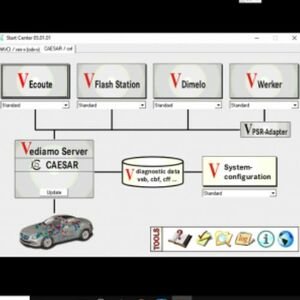

Installing Vediamo 5.01.01 (the advanced Mercedes-Benz ECU coding and programming software) requires a precise setup to work alongside Xentry and your diagnostic hardware
Here is the standard, step-by-step installation and activation workflow:
- Prerequisites
- Operating System: Windows 10 (Pro or Enterprise) is highly recommended.
- Base Software: You typically need a functioning Mercedes Xentry and DAS installation already on your machine for the drivers and system environment.
- Hardware: A compatible PassThru or dealer-level interface (e.g., Tactrix Openport 2.0, VXDIAG, Topdon Rlink X7, ISSBD J2534 or Star C4/C5/C6).
- Installation Steps
- Disable Antivirus: Vediamo’s keygen and patch files will likely be flagged as false positives. Turn off Windows Defender or your antivirus before starting.
- Run the Installer: Extract the Vediamo 5.01.01 zip folder and run the exe (or equivalent) as an Administrator.
- Follow the Prompts: Proceed through the setup wizard. It is usually best to install it in the default directory (e.g., C:\Program Files (x86)\Vediamo).
- Install Drivers: Make sure to install the specific drivers for your J2534 or C4 hardware interface so the software can communicate with your vehicle.
- Activation & Licensing
- Apply the Patch/Keygen: Copy the provided license files, patch, or keygen application into your main Vediamo installation directory.
- Generate Hardware ID (HWID): Run the keygen to generate a unique Hardware ID based on your PC.
- Activate: Input the generated license key into the Vediamo license manager to unlock the software.
- Database Setup
- CBF Files: Vediamo requires the ECU CBF databases (usually downloaded separately) to communicate with specific Mercedes control modules.
- Import Databases: Once installed, you will need to point Vediamo to your database folder so you can load your desired module variants.
Note: Because this is highly sensitive and complex dealer-level software, many users opt for professional remote installation and activation services (often priced around $40-$50 USD) to ensure the drivers, patches, and databases are configured correctly without corrupting your Xentry system.
If you want to get this set up, let me know:
- Do you have Xentry/DAS already installed on your laptop?
- What diagnostic interface (e.g., Openport 2.0, Star C4) are you using?
- Are you trying to set it up yourself, or would you like me to guide you toward remote installation services?
Be the first to review “Vediamo install Service 5.01.01”
Related products





Reviews
There are no reviews yet.