Skip to content
  • Your reliable partner.
    • Newsletter

      Sign up for Newsletter

      Signup for our newsletter to get notified about sales and new products. Add any text here or remove it.

      • Your reliable partner.
      JDTCLJDTCL
      • Home
      • Shop
        • Auto Cable Adapter Accessories
        • Automotive Parts
        • Automotive Repair Tools
        • Automotive Software
        • Car Diagnostic Tools
        • Key Remote Programming Tools
        • Marine Diagnostic Tools
        • Motorcycle Diagnostic Tools
        • Online Login Service
        • Programming Tools
        • Training Video Blog
        • Trucks Diagnostic Tools
      • About US
      • Contact
      • Login
      • Cart / 0.00 AED 0
        • No products in the cart.

          Return to shop

      • 0
        Cart

        No products in the cart.

        Return to shop

      Add to wishlist
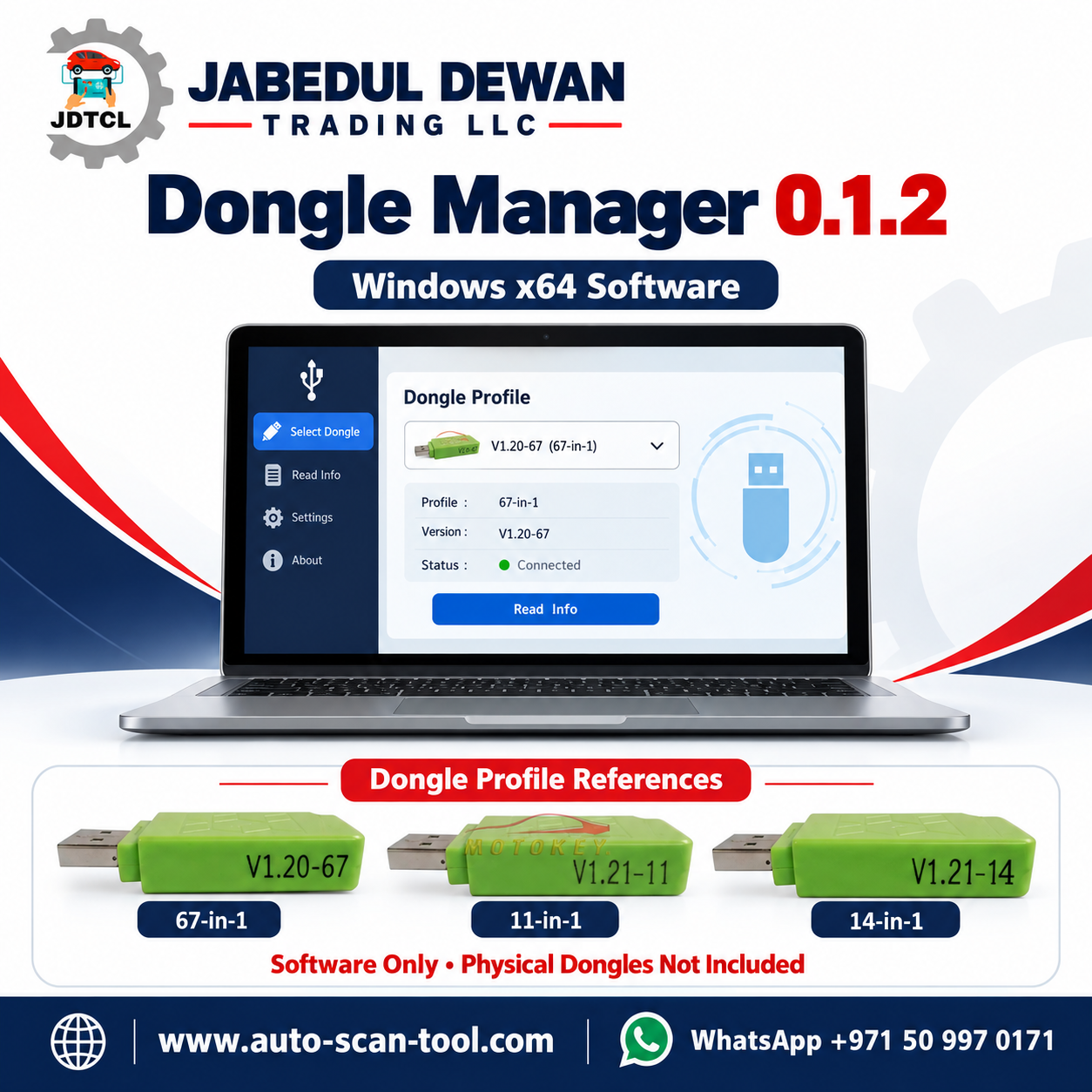
      JDTCL Dongle Manager 0.1.2 software graphic with 67-in-1, 14-in-1 and 11-in-1 dongle profile references.
      Home / All Automotive Tools

      Dongle Manager 0.1.2 for PCMFlash – Windows 10 x64

      • JDTCL Partslink24 Global OEM parts catalogue service featuring VIN lookup, exploded diagrams and technical support

      Categories: All Automotive Tools, Training Video Blog Tags: 11-in-1 Dongle Profile, 14-in-1 Dongle Profile, 67-in-1 Dongle Profile, Automotive Software, Dongle Manager, Dongle Manager 0.1.2, jabedul dewan trading llc, JDTCL, pcmflash, PCMFlash Dongle Manager, Windows 10 Software, Windows x64 Software
      • JDTCL Partslink24 Global OEM parts catalogue service featuring VIN lookup, exploded diagrams and technical support
      • Description
      • Reviews (0)

      Dongle Manager 0.1.2 for PCMFlash – Windows 10 x64

      DOWNLOAD

      Dongle Manager 0.1.2 is a Windows application designed to emulate selected third-party clone USB dongles used with specific PCMFlash versions. It provides a single interface for choosing a dongle profile, connecting or disconnecting it, checking required drivers and launching the matching PCMFlash application.

      According to the supplied package documentation, the software supports 67-in-1, 14-in-1 and 11-in-1 profiles. It is a third-party application; official PCMFlash affiliation and licence entitlement have not been established.

      Supported Profiles

      • 67-in-1: PCMFlash 1.2.0 — 67 modules.
      • 14-in-1: PCMFlash 1.2.1 — 14 modules.
      • 11-in-1: PCMFlash 1.2.1 — 11 modules.

      These figures describe the supplied profile configurations. A complete module-by-module ECU and vehicle support list has not been provided. Confirm the exact ECU, required module, interface and operation before use.

      System Requirements

      • Windows 10, 64-bit.
      • Administrator access for the initial driver installation.
      • Required drivers supplied with the package.
      • The PCMFlash version matched to the selected profile.

      Windows 11 compatibility is not confirmed in the supplied documentation.

      Main Features

      • Select between three supplied dongle profiles.
      • Connect and disconnect the emulated dongle.
      • Check for missing drivers.
      • Launch the matching PCMFlash version.
      • Restart the dongle connection when necessary.
      • Save application settings and diagnostic logs locally.
      • Prevent multiple application instances from running simultaneously.

      Setup and Operation

      1. Extract the complete ZIP archive into a folder before starting.
      2. Review the software source and security warnings before running the executable or installing drivers. The supplied application is unsigned.
      3. Open DongleManager.exe and select Check drivers.
      4. Install any required missing drivers. Administrator access and a Windows restart may be necessary.
      5. Select the profile matching the intended PCMFlash version.
      6. Click Connect dongle, then Launch PCMFlash.

      The supplied documentation states that newer PCMFlash releases are unsupported. Do not update the bundled application without confirming compatibility first.

      Connection Controls

      Connect / Disconnect: Starts or stops the dongle connection. Selecting Connect again while connected does not create another connection.

      Restart: Restarts the dongle connection. Close PCMFlash before using this control.

      Launch PCMFlash: Opens the application associated with the selected profile.

      Working with an ECU

      Keep Dongle Manager open and connected throughout an ECU operation. Do not disconnect, restart the dongle, close the application or interrupt power while PCMFlash is reading or writing an ECU. Follow the instructions for the exact ECU, interface and supported module.

      Troubleshooting

      • Dongle not detected: Close PCMFlash, disconnect and reconnect the dongle, then reopen PCMFlash.
      • Module list appears empty after reconnecting: Restart PCMFlash and check the selected profile.
      • Driver installer becomes unresponsive: Restart Windows before trying the installation again.
      • Application will not open a second time: Check whether it is already running.
      • Further diagnosis required: Review the logs in the data folder.

      Package Contents

      • DongleManager.exe — main application.
      • apps — matching PCMFlash applications.
      • profiles — supplied dongle profiles.
      • prerequisites — driver installers.
      • data — settings and logs, created on first use.

      Product Assistance

      Contact Jabedul Dewan Trading LLC to confirm the package version, application requirements and availability.

      Website: www.auto-scan-tool.com
      WhatsApp: +971 50 997 0171

      SEO Title: Dongle Manager 0.1.2 for PCMFlash | Windows x64

      Meta Description: Explore Dongle Manager 0.1.2 for Windows 10 x64, including supplied PCMFlash profiles, driver requirements, package contents and compatibility notes.

      Focus Keyword: Dongle Manager 0.1.2

      Tags: Dongle Manager, PCMFlash, Windows 10 x64, Dongle Profiles, Driver Setup, Automotive Software

      Reviews

      There are no reviews yet.

      Be the first to review “Dongle Manager 0.1.2 for PCMFlash – Windows 10 x64” Cancel reply

      Related products

      Just How Much Can You Drive After the Gas Light Activates?
      Add to wishlist
      Quick View

      Just How Much Can You Drive After the Gas Light Activates?

      0.00 AED
      Add to cart
      Bluetooth OBD2 Car Scanner Elm327 Automotive OBD OBDII Code Reader Car Check Engine Light Diagnostic Scan Tool Support Android/ PC
      Add to wishlist
      Quick View

      Bluetooth OBD2 Car Scanner Elm327 Automotive OBD OBDII Code Reader Car Check Engine Light Diagnostic Scan Tool Support Android/ PC

      25.00 AED
      Add to cart
      how to download and install Diagzone Pro Automotive Diagnosis Software
      Add to wishlist
      Quick View

      how to download and install Diagzone Pro Automotive Diagnosis Software

      0.00 AED
      Add to cart
      What Does Check Fuel Fill Inlet Mean? Is it dangerous How to Fix, Reset or Delete Code
      Add to wishlist
      Quick View

      What Does Check Fuel Fill Inlet Mean? Is it dangerous How to Fix, Reset or Delete Code

      0.00 AED
      Add to cart
      Launch X431 Car Diagnostic Scanner License Renewal Update Subscription For Diagzone Pro V2
      Add to wishlist
      Quick View

      Launch X431 Car Diagnostic Scanner License Renewal Update Subscription For Diagzone Pro V2

      700.00 AED
      Add to cart
      Xhorse VVDI Key Tool Max – Remote & Transponder Generator from Jabedul Dewan Trading LLC UAE
      Add to wishlist
      Quick View

      Xhorse VVDI Key Tool Max – Remote & Transponder Generator

      1,650.00 AED
      Add to cart
      What Is the Vehicle OBD-II Port and What Is It Used For?
      Add to wishlist
      Quick View

      What Is the Vehicle OBD-II Port and What Is It Used For?

      0.00 AED
      Add to cart
      Malfunction Sign Light MI Meaning & Solution
      Add to wishlist
      Quick View

      Malfunction Sign Light MI Meaning & Solution

      0.00 AED
      Add to cart
      Showroom- Shop F98, ALl Fahidi Souk DM Market (1st Floor), Mena Bazar,Bur Dubai,United Arab Emirates. Mobile/WhatsApp +971509970171/0565047976 Landline-045545933
      bangladesh 7/32A, Eastern Plaza, Lift-6, Hatirpul, Dhaka.Mobile WhatsApp +8801772332000/ 01817250153. www.ipcctvbd.comOMAN-MUSCAT+96894754546.QATAR DOHA +9747005605
      Visa
      PayPal
      Stripe
      MasterCard
      Cash On Delivery
      Copyright 2026 © JDTCL
      • Home
      • Shop
        • Auto Cable Adapter Accessories
        • Automotive Parts
        • Automotive Repair Tools
        • Automotive Software
        • Car Diagnostic Tools
        • Key Remote Programming Tools
        • Marine Diagnostic Tools
        • Motorcycle Diagnostic Tools
        • Online Login Service
        • Programming Tools
        • Training Video Blog
        • Trucks Diagnostic Tools
      • About US
      • Contact
      • Login
      • Newsletter

      Login

      Lost your password?