



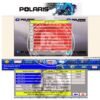
ECULite is a highly capable, entry-level, and professional calibration editing software specifically designed for chip tuning technicians who need to modify the map areas of various engine control unit (ECU) vehicle files.
Unlike complex hex editors that require you to find maps manually, ECULite utilizes a modular description map system, meaning it provides ready-made calibration tables and visual maps for supported vehicle ECUs.
Software Download and Module Activation Price lIst
🗺️ Key Map Areas Available for Basic Chip Tuning
Depending on the module and engine type (Petrol vs. Diesel), ECULite exposes critical engine management parameters:
For Petrol Engines
- Spark Advance / Ignition Timing: Adjusting timing angles to maximize power extraction from combustion.
- Torque Tables: Editing “Optimum Torque” and “Torque Request” parameters to improve throttle responsiveness.
- Emissions & Sensor Control: Modifying Diagnostic Trouble Code (DTC) detection masks for the catalytic converter and Oxygen (O₂) sensors.
- Air-Fuel Management: Tweaking throttle valve characteristics.
For Diesel Engines
- Boost Pressure: Raising or optimizing turbocharger target pressures.
- Fuel Injection Parameters: Controlling the injection start phase and duration (injection time).
- Common Rail Pressure: Adjusting fuel pressure for better atomization.
- Component Deactivation: Modifying the Exhaust Gas Recirculation (EGR) valve tables and system Error Detection Masks.
💻 Key Features of the Software Interface
The ECULite platform includes built-in safety and convenience features to streamline basic tuning:
- Multi-Dimensional Visualizations: Calibrations can be viewed and modified via raw data tables, 2D line charts, or 3D topographical surface charts.
- A/B File Comparison: Technicians can load two separate firmware files side-by-side to easily spot differences and copy specific calibrations from a known good file into a new project.
- Math Operations: The software allows quick absolute value inputs or fixed percentage changes (e.g., adding 5% more fuel across a specific load bracket).
- Hardware Protection: The program relies on a secure USB dongle license to authorize its modular activations.
ECULite is modern and user-friendly software for editing the map area of various ECUs. This program allows you to edit the calibrations of the vehicle files to perform basic chip tuning.
The following maps are available: spark advance, DTC detection mask of the catalytic converter system malfunction, exhaust gas recirculation (EGR) valve, oxygen sensor, throttle valve, optimum torque, torque request, etc.
For Diesel vehicles the following maps are available: boost pressure, torque request, injection start phases, injection time, fuel pressure, exhaust gas recirculation valve (EGR), Error Detection Mask etc.
Specifics:==
User-friendly interface with the possibility of displaying calibrations in tables, 3D and 2D charts
Display of error mask and calibration constants
Two files comparison function with the ability to copy calibrations from the compared file
Calibration editing, setting of the absolute value and changing the percentage ratio
Modular design of calibration description maps
USB dongle
Please note:
It is best to upload files to Toyota Denso and Mitsubishi Melco 3 using PCMflash. This flasher does checksum corrections before the writing. The ECULite editor does not make checksum corrections for the above ECU, as it is not necessary.
It is recommended that the file loading into Bosch EDC16U1 (31/34) ECUs should be done using Combiloader or Kess v2. The Kess v2 does checksum corrections before they are written in the ECU. In the near future Combiloader will also be able to do checksum corrections.
⚠️ Important Operational Constraints
Before editing maps with ECULite, keep these procedural constraints in mind:
- No Internal Checksum Correction: ECULite modifies file values, but for certain ECU brands like Toyota Denso or Mitsubishi Melco, it does not recalculate the final checksum. It is highly recommended to use advanced flashers like PCMflash or Kess, which automatically handle checksum corrections immediately before writing the data to the vehicle.
- Modular License Structure: You only purchase the specific car/truck modules you need (e.g., Subaru Denso, Kamaz Cummins, Toyota Petrol modules) rather than paying for a bloated database you won’t use.
- System Requirements: Runs natively on lightweight environments (Windows 7 SP2 up to Windows 11, requiring at least 2GB of RAM and a standard USB port for the security key).
🔄 Comparing ECULite with Alternatives
If you are expanding your workshop, understand where ECULite stands next to industry standards:
| Software | Intended User | Map Sourcing | Checksum Function |
| ECULite | Beginners / Specialized Garages | Built-in modular map packs | Relies entirely on external flashers |
| Alientech ECM Titanium | Mid-Tier to Professional Tuners | Automatic cloud-driver downloads | Built-in matching system |
| EVC WinOLS | Master Tuners / Developers | Manual mapping or DAMOS/A2L packs | Highly automated algorithm plugins |
To help give you the most accurate advice or steps for your tuning setup, tell me:
- What specific vehicle make, model, or ECU type (e.g., Bosch EDC16, Toyota Denso) are you looking to edit first?
- Which hardware flasher tool (e.g., PCMflash, Scanmatik, Kess) do you currently use to read and write your vehicle files?
You can buy the ECULite ECM editing software and its required USB hardware dongle key through authorized international dealers and direct tuning platforms.
Official Procurement & Verified Dealers
- Jabedul Dewan Trading L.L.C. (JDTCL): As you noted, Jabedul Dewan Trading L.L.C. (based in Dubai, UAE, with branches expanding across Oman, Qatar, and Bangladesh) is an official globally recognized distributor. They specialize heavily in automotive programmers, chip tuning software, and professional multi-brand diagnostics. They are highly regarded in the tech community for bundling their sales with free remote installation, live technical training, and ongoing support handled by their team of skilled engineers. You can contact their sales directly on WhatsApp at +971509970171.
- ECULite Official Website: You can purchase licenses and browse modules directly through the developer platform on ECULite Official Page.
Essential Purchasing Guidelines
- The Key Restriction: Hardware protection keys (typically the SenseLock EL-Genii USB key) are mandatory because the ECULite editing platform will not launch without a physical license key connected to your computer. Most distributors will not sell a standalone USB dongle unless you are simultaneously purchasing or activating at least one vehicle software module.
- Modular Format: ECULite functions via specialized software modules (e.g., Toyota Denso, Mercedes MCM, Cummins, Bosch). You pay for the baseline USB key, and then select the individual vehicle or heavy-machinery ECU modules relevant to your workshop’s tuning needs.
- System Check: Ensure your tuning PC runs a native environment (Windows 7 SP2 up to Windows 11) with a minimum of 2GB RAM. Take note that ECULite software will not launch inside virtual machine environments due to security protocols against software piracy.
To ensure you get the exact tools required, a few quick details help narrow it down:
- What specific vehicle makes, models, or ECU types (e.g., Toyota Denso, Cummins, Bosch) are you looking to edit first?
- Are you planning to pair ECULite with a specific J2534 pass-thru device or hardware flasher?

Reviews
There are no reviews yet.