

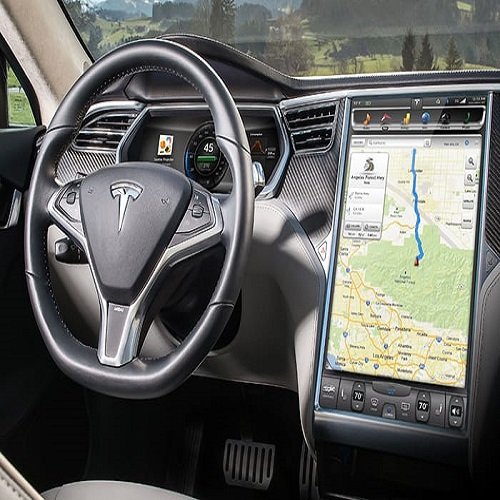

A frozen Tesla display is most commonly caused by temporary software glitches. While alarming, a frozen screen does not affect the car’s ability to drive, brake, or signal.
Common Causes
Software Issues: Bugs following a recent firmware update or “memory leaks” from running too many apps (e.g., Spotify, web browser) simultaneously.
Environmental Factors: Extreme cabin heat can cause the system to throttle performance or freeze to prevent hardware damage.
Hardware Aging: Older Model S and X vehicles (pre-2018) may have a failing eMMC memory chip, which leads to persistent freezing or black screens.
12V Battery Health: A weak or dying 12V auxiliary battery can cause flickering, random reboots, or unresponsive displays.
Immediate Solutions
Soft Reboot (Standard Fix):
While in Park (recommended), press and hold both scroll wheels on the steering wheel simultaneously.
Hold for about 10 seconds until the screen goes black.
Wait approximately 30–60 seconds for the Tesla “T” logo to appear and the system to restart.
Hard Reboot / Power Cycle:
If a soft reboot fails, navigate to Controls > Safety > Power Off.
Sit quietly in the car for at least two minutes without touching the brake, doors, or screen.
Press the brake pedal or open the door to wake the car back up.
Instrument Cluster Reset (Model S/X only):
Hold the two buttons above the scroll wheels for 15–30 seconds until that specific screen restarts.
Long-Term Prevention
Keep Software Updated: Regularly check for and install updates via the Tesla Mobile App or car settings to patch known bugs.
Manage Resources: Clear your browser cache and delete old Dashcam/Sentry Mode clips from your USB drive to free up system memory.
Use Cabin Overheat Protection: Keep this feature active in your Tesla Owner’s Manual settings to prevent the screen from reaching damaging temperatures.
If the screen continues to freeze frequently after these steps, use the Tesla App to schedule a Service Appointment, as it may indicate a hardware failure like the eMMC chip or a faulty 12V battery.
Explore common causes and fixes for a frozen Tesla car display screen, from software issues to hardware malfunctions;
Jabedul Dewan Trading Co, LLC is a prominent Dubai-based supplier specializing in automotive diagnostic scanners, ECU programming tools, and tuning software. They are an authorized dealer for major brands including Thinkcar, Jdiag, TopDiag, and Humzor.
Best-Sellers and Popular Products
Their inventory features a wide range of high-performance tools for both light and heavy-duty vehicles:
Thinkdiag 2: A highly popular full-system OBD2 code reader supporting CAN FD protocols and extensive reset functions.
PCMflash: A critical software complex for working with engine control units (ECU) and automatic transmissions (AT) across brands like Volkswagen, Toyota, and Ford.
Ecuhelp KT200 / KTFlash: Used extensively for ECM and TCM programming.
VNCI 6154A: A diagnostic scanner for VAG Group vehicles that supports online ODIS software installation and activation.
Micropod 2: Equipped with wiTech software for specialized Chrysler/Dodge/Jeep diagnostics.
Services and Training
The company provides a comprehensive ecosystem for automotive professionals:
Sales & Service: They offer worldwide sales through their Official Website and Amazon.ae storefront.
Support & Training: They are known for providing 24-hour technical support and often include installation and operating videos with their tools to facilitate “free training” or self-guided learning.
Specialized Software Services: They provide “Online Login Services” for dealer software like GM Techline Connect and specialized file services for ECU tuning (DTC off, IMMO off).
Business Details
Location: Nesto Hypermarket, Meena Bazaar – Shop F98, Bur Dubai, UAE.
Contact: +971 50 997 0171 (WhatsApp available).
Hours: Open daily from 9:00 AM to 11:00 PM.
Would you like to know more about a specific brand of scanner or details on their ECU tuning file services?


Reviews
There are no reviews yet.