



ABS V4.0 For VW ABS Module CodingABS V4.0 usually refers to a specific hardware generation or diagnostic protocol layout for older Volkswagen (VW) ABS/ESP modules, often matching early generation Bosch or Continental Teves units (such as MK60 or Bosch 5.7 architectures).Coding a replacement or wiped VW ABS module requires a diagnostic scan tool like VCDS (VAG-COM), ODIS, or an advanced multi-brand tool like Autel/Launch. Because VW ABS coding is linked stringently to the specific vehicle’s Vehicle Identification Number (VIN), engine type, brake hardware size, and transmission, there is no generic “one-size-fits-all” code.Phase 1: Retrieve Your Original Code (Best Method)If you are replacing a faulty module but it can still communicate, always pull the original coding before removing the part.Connect your scan tool to the OBD2 port.Navigate to 03 – Brake Electronics.Select Coding – 07 (or Long Coding Helper).Copy and save the exact string of digits or hexadecimal values listed under “Current Coding”.Install the new/used module, return to this screen, and paste the saved code.Phase 2: Generating a New Code (If the Old Code is Lost)If the ABS module was swapped without saving the original data, the coding will read as a string of zeros (\(00000…\)). You must rebuild or fetch the code through one of these methods:Check Historical Auto-Scans: If you use Ross-Tech VCDS, browse your laptop’s directory for the Scans folder. Search for older, automatic logs of that car’s VIN to locate the old ABS coding block.Online Server Generation (ODIS / Autel): If you use factory ODIS software or an advanced Autel tool with online capabilities, select the Online Coding / Component Programming function. The scanner will query the Volkswagen central database using your vehicle’s VIN and pull down the factory-correct long code automatically.Manual Calculation via Vehicle Build Codes (PR-Codes): Traditional ABS short/long coding functions rely on adding up bitmasks corresponding to your vehicle setup. You will need your vehicle’s build sticker (found in the trunk or service book) to identify:Engine ID/Type (e.g., Diesel, Turbo Gasoline)Brake Disc Diameter / PR Code (e.g., PR-1ZE, PR-1LJ)Suspension Type (Standard, Sport, Rough Road)Phase 3: Crucial Basic Settings Required After CodingMerely inputting the code is only half the process; an ABS module will continue throwing error lights until the vehicle’s primary directional sensors are calibrated to the new module.Once the code is successfully accepted, navigate to Basic Settings – 04 within the Brake Electronics module to complete these steps:G85 Steering Angle Sensor Calibration: Turn the steering wheel straight, access block 060 (or use login code 40168 if required), and perform the calibration.G200 Lateral Acceleration Sensor: Calibrate with the vehicle sitting completely flat and level.G201 Brake Pressure Sensor: Calibrate with your foot completely off the brake pedal.
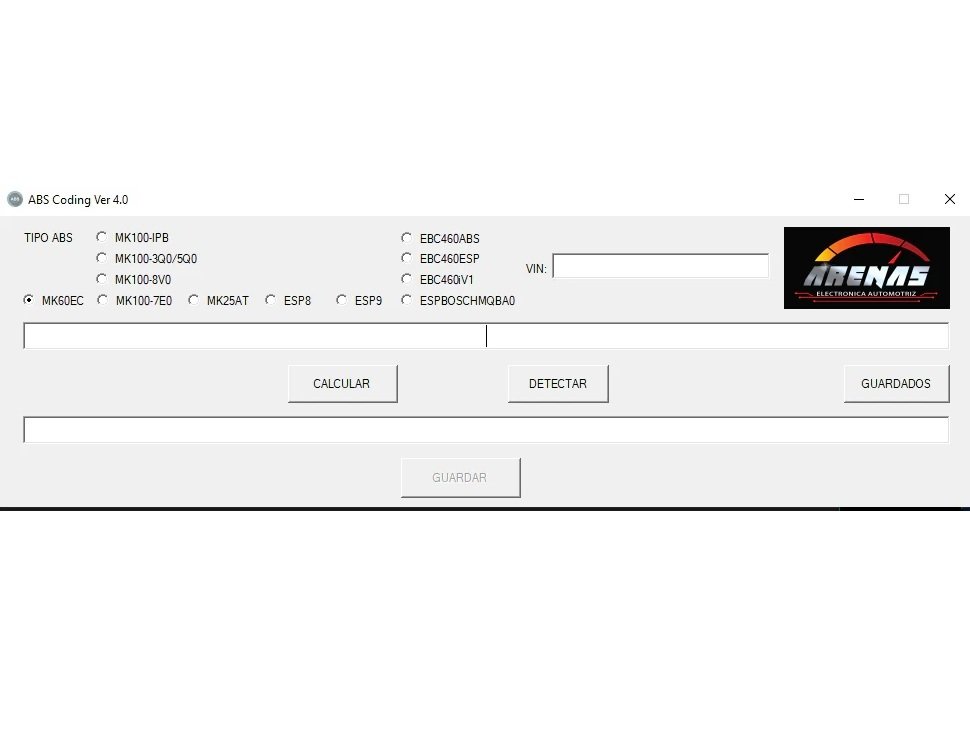
The program in the screenshot is ABS Coding Ver 4.0 by Arenas Electrónica Automotriz. It’s a coding calculator tool mainly used for Volkswagen, Audi, Seat, Skoda (VAG group) ABS/ESP modules.
Here’s a breakdown for you:
🔹 What it does
Helps calculate the long coding string for ABS/ESP modules after replacement, adaptation, or retrofit.
Works with several ABS/ESP control units like:
MK60EC
MK100 variants (IPB, 3Q0/5Q0, 7E0, 8V0)
ESP8 / ESP9
EBC460ABS / ESP / V1
ESP BOSCH MQBA0
MK25AT
Lets you input the VIN and system type, then it generates or detects the correct coding.
🔹 Main functions on the screen
TIPO ABS – choose the ABS/ESP module type installed in the car.
VIN – enter the vehicle VIN (important for generating correct coding).
CALCULAR – calculate the coding string.
DETECTAR – detect the coding automatically from VIN and module type.
GUARDADOS – access saved codings (previously stored results).
GUARDAR – save the current coding (button is only active after a calculation).
🔹 How to use (basic workflow)
1. Identify ABS unit – check the part number of the ABS/ESP module (using VCDS, ODIS, or on the physical unit).
2. Select module type in the program (e.g., MK60EC).
3. Enter VIN – type in the car’s VIN.
4. Click DETECTAR – the program will try to fetch the correct long coding.
If detection fails, you can click CALCULAR to manually generate the coding.
5. Once coding is generated, copy it and use a diagnostic tool (like VCDS, ODIS, or OBDeleven) to write the coding back to the ABS module.
🔹 Requirements
Works on Windows PC.
Requires no direct connection to the car (it only generates coding strings).
A diagnostic interface (VCDS, ODIS, Launch, etc.) is still needed to apply the coding.
👉 This tool is especially useful if you replace an ABS module and the original coding is lost (often shows as 0000000000000 in VCDS). Instead of guessing or searching, you generate the exact coding.
One common challenge for Volkswagen and other VAG group car owners is dealing with ABS module coding after replacement or repairs. When an ABS or ESP module is replaced, the original coding is often lost, displaying as a string of zeros in diagnostic tools, which leaves vehicle owners and mechanics guessing or spending hours searching for the correct settings. This coding issue can disrupt vehicle safety features, cause warning lights, and ultimately impact the car’s performance and reliability.
This problem significantly affects your ability to maintain vehicle safety and can cause costly delays in repairs or retrofits. Without the right coding, ABS and ESP modules won’t function correctly, leading to potential safety risks on the road. Additionally, mechanics and technicians face frustration and loss of valuable time, as manual coding is complex and prone to error.
Introducing the ABS V4.0 for VW ABS Module Coding – the perfect solution to this coding dilemma. This powerful program simplifies and automates the process of generating the correct long coding string for ABS/ESP modules in Volkswagen, Audi, Seat, and Skoda vehicles. It eliminates guesswork and streamlines module replacement, adaptation, or retrofit procedures.
Accurately calculates long coding strings for multiple ABS/ESP control units such as MK60EC, MK100 variants (IPB, 3Q0/5Q0, 7E0, 8V0), ESP8/ESP9, EBC460, BOSCH MQBA0, and MK25AT.
Allows you to enter the vehicle’s VIN and select the ABS/ESP module type to generate or detect the precise coding needed.
Supports workflow steps such as detecting existing coding automatically or manually calculating it, then saving and exporting the correct coding string for direct use with popular diagnostic tools like VCDS, ODIS, or OBDeleven.
Users have praised this tool for restoring ABS module functionality quickly and effectively, eliminating hours of manual troubleshooting. Many professionals who have integrated this software into their workflow report faster repairs and increased confidence in coding accuracy.
Don’t let lost ABS coding slow down your vehicle maintenance or compromise safety. Invest in ABS V4.0 for VW ABS Module Coding today and enjoy accurate, hassle-free ABS and ESP module coding on your Windows PC. Streamline your repair process and restore your vehicle’s safety systems with ease get your license now and take control of ABS coding for all your VW and VAG group vehicles.

Reviews
There are no reviews yet.