

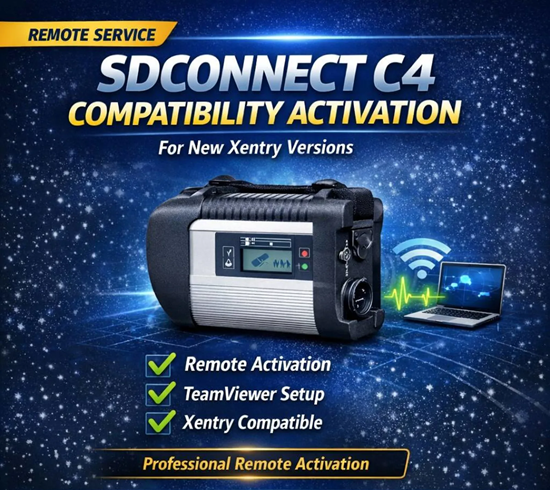


Xentry SDConnect C4 Compatibility Activation is a specialized remote setup service designed to configure the communication bridge between a Mercedes-Benz vehicle and the official Xentry Diagnosis software. This service is typically used by independent workshops or technicians to enable high-level functions—such as SCN coding, module programming, and retrofitting—remotely without the vehicle needing to be at a dealership.
Remote activation service to enable SDConnect C4 compatibility with newer Mercedes Xentry diagnostic software versions. Professional remote setup via Ultraviewer.
Core Components of the Service
Hardware Interface (SDConnect C4): This is the physical multiplexer that connects to the vehicle’s OBD-II port. It acts as the bridge for two-way communication between the car’s electronic control units (ECUs) and the diagnostic software.
Virtual Bridging: The remote setup creates a “virtual bridge” (often using specialized software like eLinehub or TeamViewer) that makes the remote SDConnect C4 behave as if it were plugged directly into the technician’s local network.
Software Activation: This involves configuring the Xentry and DAS (Diagnostic Assistance System) platforms to recognize the specific C4 unit, which may require entering unique Hardware IDs or StartKeys provided by a dealer or service provider.
Key Capabilities Enabled
SCN (Software Calibration Number) Coding: Essential for initializing new control modules like steering racks or transmission units after replacement.
Vehicle Retrofits: Remotely activating pre-installed options or new hardware such as LED headlamps, digital clusters, or MBUX systems.
Diagnostic Accuracy: Provides OEM-level access to read and clear fault codes, view live data streams, and perform actuator tests across all vehicle systems (Engine, ABS, SRS, etc.).
Firmware Updates: Managing and installing the latest software updates for various vehicle modules to ensure ongoing compatibility and safety.
Why Use Remote Setup?
Access to Expertise: It allows local mechanics to hire specialized remote technicians who hold the necessary OEM credentials (like Xentry Flash authorization) to perform complex coding.
Cost Efficiency: It is often reported to be significantly cheaper (up to 1/3 the cost) than hiring an external technician to visit the shop in person.
Stability for Flashing: Professional remote setups are tuned to handle high-data bursts and long sessions required for ECU flashing, which generic remote desktop tools may struggle with.
Would you like to know the minimum hardware requirements for the PC used in this remote setup?
SDConnect C4 Compatibility Activation is a remote activation service designed to ensure your SDConnect C4 diagnostic interface works correctly with newer Mercedes-Benz Xentry diagnostic software versions.
Many recent Xentry releases require additional compatibility activation for SDConnect C4 devices. Without this activation, the diagnostic interface may not communicate properly with the software.
Our technician will perform the activation remotely using TeamViewer or AnyDesk, ensuring your device works smoothly with the latest Xentry environment.
What This Service Includes
SDConnect C4 compatibility activation
Configuration for newer Xentry versions
Remote setup via TeamViewer or AnyDesk
Verification and connection testing
Ensuring stable communication between Xentry and SDConnect C4
Remote Activation Process
After purchase, our technician will schedule a remote session via TeamViewer or AnyDesk to activate and configure your SDConnect C4 device.
The activation process typically takes 10–20 minutes and will ensure your diagnostic interface is fully compatible with the latest Xentry software.
Requirements
Before the activation session, please ensure:
SDConnect C4 device is connected to your computer
Xentry software is installed
Stable internet connection
TeamViewer or AnyDesk available for remote access
Compatibility
This activation service supports:
Mercedes-Benz Xentry Diagnostic Software
SDConnect C4 Diagnostic Interface
Compatible with most recent Xentry versions;
For purchasing Xentry SDConnect C4 Compatibility Activation and remote setup services in Dubai, Jabedul Dewan Trading LLC is a known provider specializing in professional automotive diagnostic tools and online activation support.
Where to Buy: Jabedul Dewan Trading LLC
This business operates as a specialized trader of diagnostic equipment and offers remote installation and activation services for various vehicle software, including Mercedes-Benz systems.
Online Presence: You can find their product listings and services on the Jabedul Dewan Trading LLC storefront on Amazon.ae.
Direct Contact: They maintain a highly active business profile on WhatsApp for direct service inquiries and technical support.
WhatsApp Contact: wa.me/jdtcl.
Social Media: For latest updates on their diagnostic tools and programming services, you can check their official Facebook page.
Business Hours: Open daily from 9:00 AM to 11:00 PM.
Service Details
Xentry SDConnect C4 Compatibility: They provide software versions (e.g., 2023.09 or newer) compatible with SDConnect C4 multiplexers, supporting both 12V cars and 24V trucks.
Remote Setup: Services typically include remote installation via TeamViewer or similar platforms, covering Xentry, DAS, WIS, and EPC software suites.
Online Activation: They specialize in activating specific features such as S223 SOS fixes, CPC programming, and AMG menu retrofits through remote coding.
Do you need the specific software version or hardware-software bundle price for your Mercedes model?



Reviews
There are no reviews yet.