

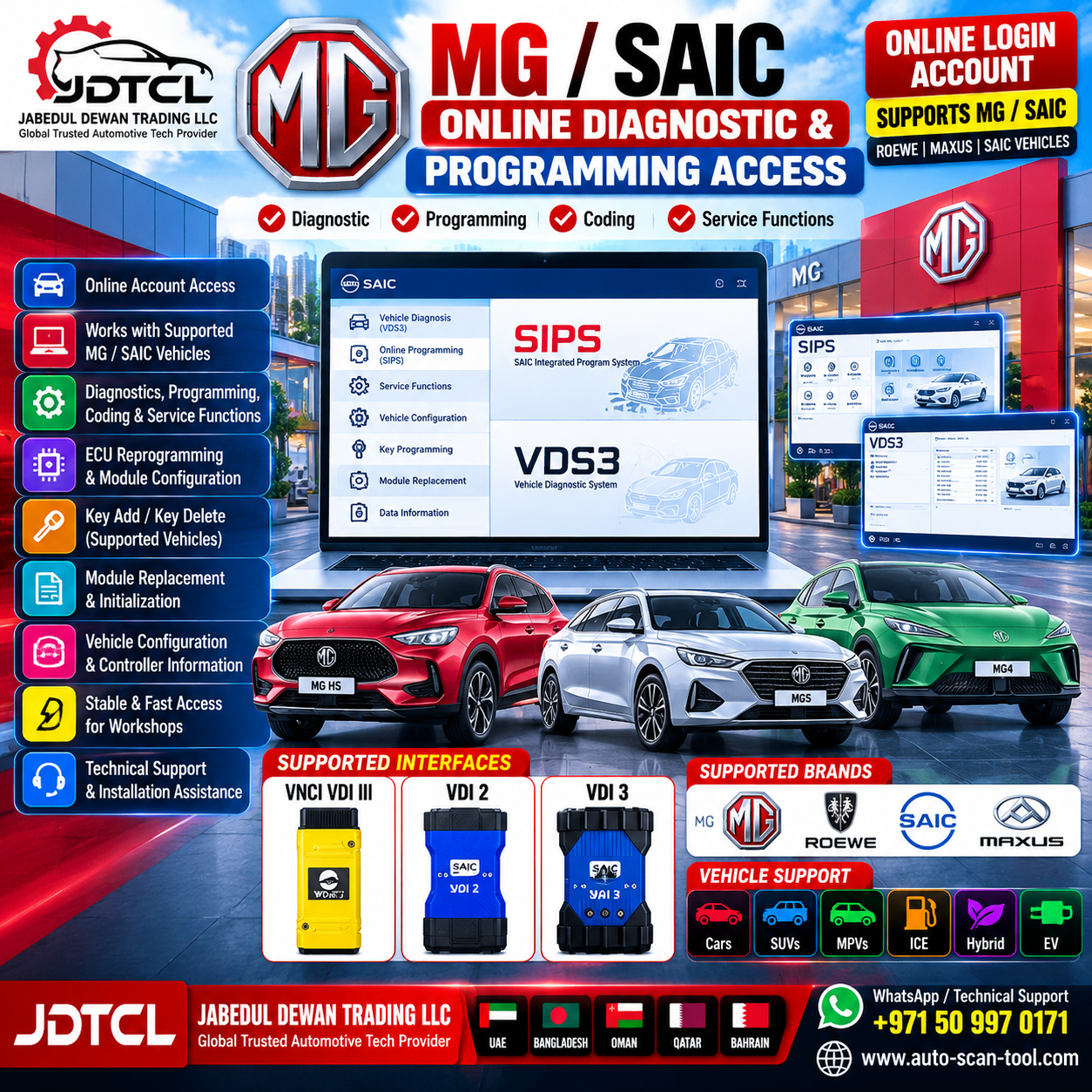


China SAIC MG SIPS Online Programming & Diagnosis Login Account Details
SAIC MG SIPS Online Programming & Diagnosis Login Account is a professional online access solution for workshops and automotive technicians working with supported SAIC Motor, MG, Roewe and related SAIC vehicle platforms.
The SAIC diagnostic ecosystem combines diagnostic software such as VDS3 with SIPS (SAIC Integrated Program System) for online ECU programming, configuration, module replacement and other manufacturer-supported service procedures.
SIPS retrieves vehicle manufacturing/configuration information and applicable programming data from the manufacturer server during supported online operations.
Main SAIC SIPS Functions
Depending on vehicle, ECU, account authorization and software version, supported functions can include:
- Online ECU programming
- ECU software updates
- ECU reprogramming
- Control-module configuration
- Replacement-module programming
- ECU replacement procedures
- Vehicle configuration
- Controller information query
- Vehicle configuration information query
- Calibration procedures
- Coding functions
- Module initialization
- Supported key addition
- Supported key deletion
- Vehicle-specific service procedures
The SAIC SIPS documentation specifically describes programming, configuration, replacement and supported key add/delete operations.
SIPS Programming System
SIPS – SAIC Integrated Program System is the programming/configuration side of the SAIC service platform.
The SIPS Client communicates with the vehicle through the VDI (Vehicle Diagnostic Interface) and uses online manufacturer data to perform supported programming and coding procedures.
SIPS Functions Can Include
- ECU software version checking
- ECU reprogramming
- Calibration updates
- New ECU programming
- Replacement ECU configuration
- Module replacement
- Vehicle configuration
- Controller configuration
- Coding
- Initialization
- Supported key-related service operations
- Online vehicle data retrieval
VDS3 Online Diagnosis
For supported vehicles, VDS3 handles the diagnostic side of the SAIC service environment.
Typical functions include:
- Vehicle identification
- Full-system diagnostics
- DTC Read
- DTC Clear
- Freeze-frame information
- ECU information
- Live Data
- Data monitoring
- Actuator Tests
- Guided routines
- System calibration/reset procedures
- Vehicle-system diagnosis
Available functions vary according to the vehicle and ECU. Third-party documentation for VDI3 similarly lists DTC read/clear, freeze-frame data, live data, guided routines and actuator testing under VDS3.
SIPS + VDS3 Online Account
A compatible online account can be used with the VDS3 diagnostic environment and SIPS programming environment where the account has the necessary authorization.
Available third-party service documentation indicates that VDS3 and SIPS use online login access and may share account credentials, although the two applications may need to be used separately rather than logged in simultaneously.
Supported Vehicle Brands
Depending on account authorization, market, vehicle and software coverage:
MG
Supported China/SAIC MG vehicle applications.
Roewe
Supported SAIC Roewe vehicles.
SAIC Motor
Supported SAIC passenger-vehicle applications.
MAXUS
Some SAIC diagnostic ecosystems also cover supported MAXUS applications, but software/account authorization can differ from MG/Roewe coverage.
Please confirm the exact brand and VIN before purchase.
Vehicle Type Support
Depending on vehicle coverage:
- Passenger cars
- SUVs
- MPVs
- Gasoline vehicles
- Diesel applications where supported
- Hybrid vehicles
- Plug-in hybrid vehicles
- Battery electric vehicles
Coverage is VIN-, market- and software-dependent.
ECU & Module Programming Support
SIPS can provide programming/configuration procedures for supported vehicle modules.
Applications may include:
- Engine ECU / ECM
- Transmission / TCM
- Body Control Module
- Instrument Cluster
- Steering modules
- SRS / Airbag modules
- Infotainment/audio modules
- Gateway modules
- Other programmable SAIC control units
Third-party documentation for the SAIC SIPS environment specifically reports programming applications involving engine, instrument, audio, airbag and steering systems.
Module Replacement
One of the important SIPS functions is support for control-unit replacement procedures.
A typical supported workflow may involve:
Vehicle Identification → Controller Information → Replacement Module → Programming → Configuration → Initialization → DTC Check → Vehicle Verification
The exact process depends on the vehicle and controller.
Vehicle Configuration
SIPS includes access to vehicle configuration information.
The SAIC manual describes functions including:
- Vehicle Configuration Search
- Controller Information Query
- SIPS information
- Programming/configuration functions
This helps technicians identify and configure supported replacement controllers correctly.
Key Programming Functions
SIPS documentation includes supported key addition and key deletion among its service/programming capabilities.
Security and immobilizer operations can require:
- Correct vehicle ownership/authorization
- Appropriate account permissions
- Vehicle-specific security authorization
- Additional codes or credentials
The online login account does not guarantee unrestricted access to every immobilizer or security operation.
Key/security procedures should only be performed for vehicles owned by the customer/workshop or where the technician has explicit authorization.
Supported Diagnostic Interfaces
SAIC VDI II / VDI2
Supported SAIC/MG VDI II hardware can be used for compatible VDS/SIPS applications.
SAIC VDI III / VDI3
VDI III is a newer SAIC diagnostic communication interface used with supported online diagnostic and programming applications.
Available documentation for third-party login services specifically identifies MG/SAIC VDI II and VDI III for VDS3/SIPS operation.
Recommended Setup
For the most reliable operation, use:
- Compatible SAIC VDI II, or
- Compatible SAIC VDI III
with the correct drivers and software configuration.
Online Programming Requirements
For online SIPS programming, technicians should have:
- Windows laptop
- Compatible SAIC VDI interface
- Correct VDI drivers
- SIPS software
- VDS3 software where required
- Valid online login/account authorization
- Stable high-speed internet
- Stable vehicle battery voltage
- Professional battery-support unit for programming
Programming Safety
Before starting ECU programming:
- Verify the VIN
- Confirm the correct target ECU
- Check current ECU software information
- Use a professional battery-support unit
- Maintain stable vehicle voltage
- Keep the laptop connected to AC power
- Maintain reliable internet
- Verify VDI communication
- Do not disconnect the VDI during programming
- Never interrupt an active ECU flash procedure
Interrupting programming can leave a control unit requiring recovery or replacement.
Diagnosis + Programming Workflow
A professional workshop workflow can include:
Connect VDI → Identify Vehicle → VDS3 Diagnosis → Read DTCs → Check ECU Information → Confirm Repair Requirement → Launch SIPS → Select Controller → Retrieve Online Data → Programming/Configuration → Clear DTCs → Final Vehicle Test
Suitable For
This service is suitable for:
- MG workshops
- SAIC specialists
- Roewe workshops
- Automotive diagnostic technicians
- Auto electricians
- ECU programming specialists
- EV/Hybrid technicians
- Module-replacement specialists
- Automotive electronics workshops
JDTCL Technical Support
Jabedul Dewan Trading LLC (JDTCL) provides assistance with:
- SAIC SIPS installation
- MG VDS3 installation
- Online login setup
- VDI II configuration
- VDI III configuration
- VDI driver installation
- Vehicle communication setup
- Diagnostic setup
- SIPS programming workflow guidance
- ECU/module programming assistance
- Module replacement workflow assistance
- Remote technical support
- After-sales technical support
Jabedul Dewan Trading LLC (JDTCL)
Global Trusted Automotive Tech Provider
UAE | Bangladesh | Oman | Qatar | Bahrain | Worldwide
WhatsApp / Technical Support: +971 50 997 0171
Website: auto-scan-tool.com
Compatibility Notice
SAIC SIPS/VDS3 functionality varies according to VIN, vehicle model, model year, market, ECU/module, software version, VDI hardware and account authorization.
Before ordering, please provide:
- Vehicle brand
- Vehicle model
- Model year
- VIN
- Required diagnostic/programming function
- VDI interface model
We can then confirm the appropriate software and interface requirements.
- Automated Auto-Login Subscriptions: Third-party providers configure an auto-login client on your diagnostic PC. This allows you to open VDS3 or SIPS and bypass the login prompt automatically for the duration of your license window. These licenses are commonly sold as:
- 1-Hour Accounts
- 1-Day Accounts
- 7-Day Accounts
- 6-Month Accounts
- 1-Year Accounts


Reviews
There are no reviews yet.