

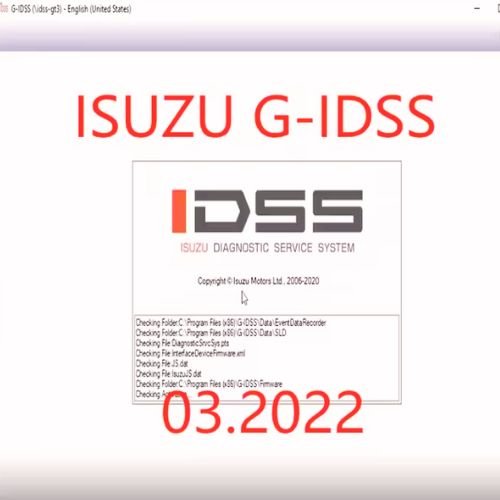
The Isuzu Diagnostic Service System (IDSS) is the official, dealer-level diagnostic and service software platform designed to interface with Isuzu vehicles, commercial trucks, and industrial engines. It combines specialized Windows-based software with a dedicated hardware interface module (typically a J2534 device or MX2-T adapter) to communicate directly with vehicle control units.
Core Software Variations
The Isuzu IDSS ecosystem is divided into specific versions depending on the target vehicle or machinery type:
- G-IDSS (Global Isuzu Diagnostic Service System): Built specifically for on-highway commercial trucks, buses, and light pickups (such as the N-Series, F-Series, and D-Max models).
- E-IDSS (Engineering Isuzu Diagnostic Service System): Exclusive software dedicated to Isuzu industrial engines found in heavy machinery, construction equipment, and excavators (like Hitachi, Sumitomo, Kobelco, and Kato)
Key Diagnostic & Service Functions
The system provides complete dealership-level authority over vehicle troubleshooting and module configurations, including:
- Comprehensive Diagnostics: Real-time data monitoring and fault code reading/clearing for the engine, transmission, chassis, and body controllers.
- Bi-Directional Controls: Forcing Diesel Particulate Filter (DPF) regenerations, executing cylinder cutout tests, and performing adblue/DEF diagnostics.
- Controller Programming: Updating and reprogramming vehicle Electronic Control Modules (ECMs/ECUs) with new calibration files or writing vehicle VINs
- Component Coding: Programming and rewriting injector codes after replacements and resetting adaptions/re-learn commands.
- Service Manuals & Bulletins: Viewing built-in wiring diagrams, technical service bulletins (TSBs), and precise torque specifications.
Vehicle & Hardware Requirements
- Supported Coverage: Models from 1996 to the latest production years are supported across global regions. Note: North American market trucks equipped with non-Isuzu power plants (such as Cummins engines) utilize separate diagnostic platforms
- Operating System: Windows 7, Windows 10, or Windows 11 (64-bit systems are standard).
- Hardware Interface: Connects via a standard laptop USB port to the truck’s OBD-II or 9-pin diagnostic port using official hardware like the Isuzu IDSS Interface Module Kit or standard J2534 pass-through devices.
To help you get the exact setup you need, please let me know:
- Are you working on on-highway commercial trucks or industrial heavy machinery?
- Do you already own the hardware interface link/adapter cables, or do you need a complete kit?
- What specific diagnostic or programming task are you attempting to perform?
Be the first to review “Isuzu IDSS Vehicles Diagnostic & Service Software For Truck & Car”
Related products


Reviews
There are no reviews yet.