

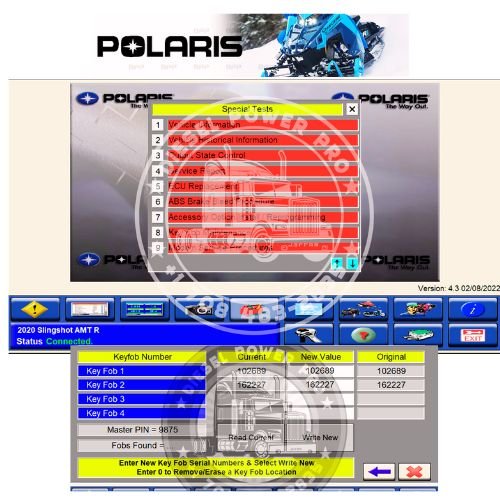
Polaris Digital Wrench 4.3 is an OE-level diagnostic software used for servicing, configuring, and updating Polaris, Indian, and Victory vehicles. A remote installation and activation service allows a technician to securely access your PC via software like AnyDesk to install, configure, and activate the application without you needing to handle the complex setup files.
What You Need to Know
- System Requirements: The software typically requires a PC or laptop running Windows 10 or 11 (32- or 64-bit). It will generally not work on older systems like Windows XP, 7, or 8.
- Coverage: Digital Wrench 4.3 typically supports older and standard models, while Digital Wrench II is usually required for newer vehicles (2022 and up).
- Hardware: You will still need the physical Polaris MultiLink/SmartLink Interface and the corresponding diagnostic cables connected to the vehicle.
- Setup Requirements: A stable internet connection is required for the remote technician to complete the installation and activation
How the Remote Service Works
- Provide Details: You purchase the remote installation package (often found on specialized auto-diagnostic marketplaces like eBay or hardware supplier sites
- Download Tools: You download and install a remote desktop application like AnyDesk or TeamViewer on your PC.
- Session Initiation: You provide the remote technician with temporary access credentials so they can log into your computer.
- Installation & Activation: The technician performs a clean installation, configures the necessary COM ports, applies the license/activation, and tests the connection.
- Final Setup: Once the technician finishes, the software is fully ready for you to connect your interface to the machine’s diagnostic port
Could you tell me:
- What vehicle year and model are you trying to diagnose?
- Are you looking for the software only, or do you need the hardware interface as well?
I can help point you toward the right package or diagnostic kit for your specific needs.

Reviews
There are no reviews yet.