

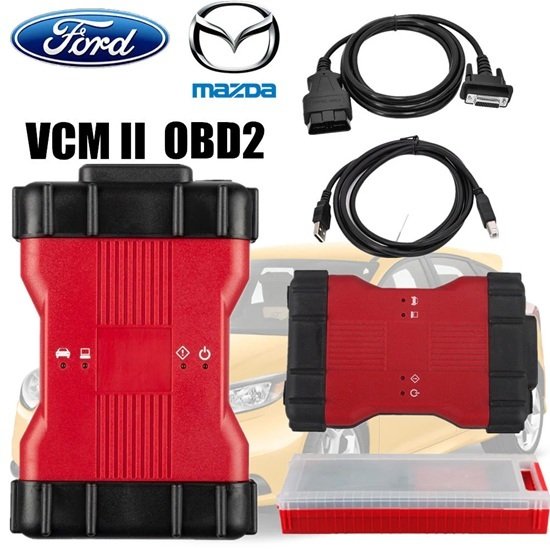

The VCM2 Ford/Mazda 2-in-1 Diagnostic Tool is a dealer-level OBD2 scan interface designed to work directly with Ford’s Integrated Diagnostic System (IDS) and Ford Diagnostic and Repair System (FDRS) software platforms. It serves as a reliable multi-purpose tool for automotive workshops and technicians looking to handle deep diagnostics, module flashing, and key programming on both passenger cars and trucks.
Core Diagnostic Capabilities
- Full Dealer Functions: Perform automatic vehicle recognition, read and clear diagnostic trouble codes (DTCs), and handle complex maintenance procedures like DPF regeneration, brake bleeding, and steering angle resets.
- Live Data & Flight Recording: Supports real-time data streaming along with the Customer Flight Recorder (CFR) function to record active parameters while driving to catch intermittent faults.
- Advanced Coding: Supports injector coding, adjusting speed governors, and resetting parameters across body, chassis, and powertrain modules.
Software Compatibility
The “2-in-1” designation means the hardware is flashed with unlocked firmware capable of communicating with both Ford and Mazda vehicle architectures.
- Ford IDS / FDRS: Works seamlessly with IDS for older/legacy vehicles and communicates via FDRS for newer Ford vehicles.
- Mazda IDS: Offers full coverage for Mazda vehicles using dedicated Mazda dealer software systems.
- Installation Rule: While the hardware is shared, the Ford IDS and Mazda IDS software packages cannot be installed natively on the exact same Windows operating system. Technicians must split them up using virtual machines (like VMware) or dedicated hard drives.
Online vs. Offline Programming
- Offline Programming (As-Built Data): For older vehicle modules, you can load local calibrations and “As-Built” text files directly through older IDS versions without an active web connection.
- Online Programming (FDRS/Newer IDS): To flash or replace newer modules (PCM, ABS, Instrument Clusters), you must hook up an active internet connection. For online flashing to execute securely, you need a paid, valid OEM dealer account subscription to pull the security tokens and files straight from the factory servers.
Hardware Variants Notice
Be careful when purchasing third-party VCM2 units. A high-quality “Full Chip” or dual-board layout variant offers stable voltage control and accurate data transmission during critical ECU programming. Lower-tier, single-board clones exist but may fail or disconnect mid-flash, risking bricked vehicle modules.
If you are setting this up, let me know:
- What years and models of cars/trucks you plan to service?
- Which specific Windows operating system version you have on your shop laptop?
- If you need help configuring the VMware environment for dual Ford/Mazda compatibility?
- Ford Mazda VCM2 Features:
1. The VCM II is the new for Ford OEM diagnostic tool. It provides dealer-level diagnostics using the IDS software.
2. The VCM II is the brand new diagnostics interface from for Ford and Mazda for use with the Integrated Diagnostics Software (IDS).
3. The VCM II and IDS provides full dealer diagnostic capabilities for most 16 pin for Ford and Mazda.
4. The VCM II will be required for a few new 2013 for Ford and vehicles and is backwards compatible with most 16 pin for Ford and Mazda.It supports the Vehicle Measurement Module (VMM) and new Customer Flight Recorder (CFR).
5. The VCM II has shock resistant rubber ends, making it suitable for garage and workshop environments.
6. The CFR replaces the Vehicle Data Recorder (VDR).
7. The CFR is an optional cable that allows the VCM II to monitor and record live data streams. This provides an advantage for technicians when diagnosingVCMII 2 in 1 for Ford and Mazda Function:
- 1. Programming & Installation of new ECUs (PCM, ABS, Instrument Cluster, Air Bag, Fuel Pumps, etc.)
2. Live Data-stream with Recording & Playback Functions for Main ECUs
3. Read & Clear Diagnostic Trouble Codes (DTCs)
4. Set, Adjust or Remove Speed Governors
5. Automatic vehicle recognition
6. New Software Re-flash for Existing ECUs
7. All Other Dealer Functions
8. Steering Angle Resets
9. Guided Fault Finding
10. Program New Keys
11. DPF Regeneration
12. Brake Bleeding
13. Injector CodingNOTE: Need to go to VX manger to install Ford Mazda driver
Ford/Mzd cannot be installed on the same system
Requirement on Computer:
1. At least 4GB Memory
2. Needs to be produced after 2000 year, older computer can not run the software.
3. operation system needs to be window 10 or window 7.

Reviews
There are no reviews yet.