

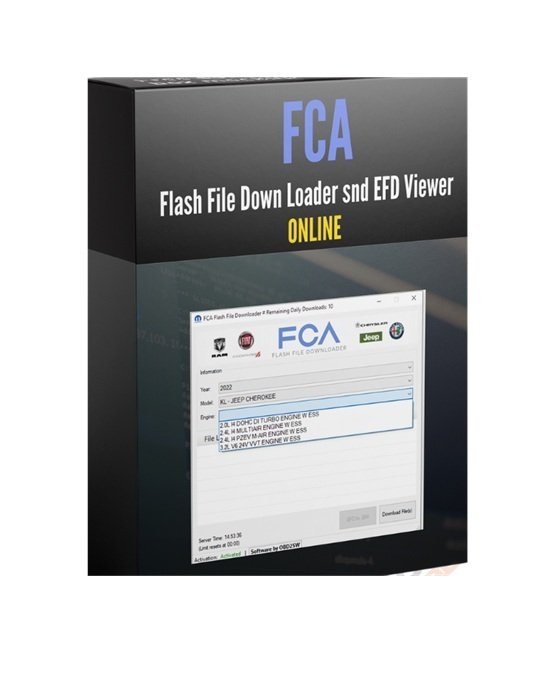

To Flash an ECU on a Fiat Chrysler Automobiles (FCA/Stellantis) vehicle using a standard J2534 pass-thru device, you must use the official wiTECH 2.0 J2534 Application combined with the legacy Chrysler J2534 Flash Application.
You can purchase online login access for the FCA J2534 Flash Downloader directly from Jabedul Dewan Trading Co, LLC by visiting their official store web page at auto-scan-tool.com. They specialize in automotive diagnostics software and OEM programming setup, providing free technical support for account installation and login troubleshooting
How to Buy and Access
- Official Website: Browse their software solutions directly on the Auto Scan Tool Shop.
- Direct Contact: To get the exact setup configurations, ask about ongoing subscription pricing, or secure direct setup assistance, you can message them directly on the Jabedul Dewan Trading LLC WhatsApp Business Profile or call them
- at +971 50 997 0171.
- Alternative Retail Channel: You can also check their regional listings via the Jabedul Dewan Trading LLC Storefront on Amazon.ae for related diagnostic cables and hardware.
Technical Support Features
- Installation Support: Includes remote configuration setup via WhatsApp or remote desktop software to get your J2534 interface fully connected.
- Login & Resets: Ongoing technical support covers password resets, ID management, and system requirements troubleshooting if you have any issues with the flash application.
- Hardware Compatibility: Supports common SAE J2534 Pass-Thru tools like Autel J2534, Launch J2534, Openport, and Scanmatik 2 PRO interfaces.
If you would like, I can help you confirm the laptop system specifications required for the application or find instructions on J2534 driver configurations. How would you like to proceed?
- Download the Software
The software package is available via the official Mopar Aftermarket Support Portal
Account Creation: Register and log in to an aftermarket account.
- Application Download: Navigate to the support/download tab to get the wiTECH 2.0 J2534 Application installation package.
- Purchase the Required Subscriptions
You need two components to successfully download and program flash files:
- wiTECH 2.0 Subscription: Required to run the diagnostic tool framework.
- Vehicle Reprogramming Subscription: Purchased via the wiTECH 2.0 Account Manager. It costs $35 per VIN for a 1-year duration and allows you to flash all applicable ECUs on that specific vehicle.
- Note: For certain older vehicle calibrations, a TechAuthority subscription may also be required.
- Launching and Downloading Flash Files
Depending on the model year of the vehicle, the application processes files differently:
- Modern Vehicles (CAN Bus): Flash files are automatically retrieved and managed directly inside the wiTECH 2.0 J2534 Application.
- Legacy Vehicles (Non-CAN): Open the wiTECH 2.0 application, click Connect, and select Switch to Chrysler J2534 Flash Application.
- Manual File Injection (If required): If you are forced to download a flash file manually through the Stellantis Independent Operator Portal (IOP), you must put the downloaded files into your local Windows temporary directory (AppData/Local/Temp/low) before opening the J2534 Flash app.
- Technical System Requirements
- Operating System: A clean Windows 10 installation is recommended.
- Java Setup: Legacy file downloads often require Java 8 (32-bit) with the TechAuthority URLs manually added to the Java “Exception Site List” to prevent download blocks.
- Device: Ensure your pass-thru hardware is on the official FCA US Verified J2534 Devices List.
If you are dealing with a specific vehicle, tell me the year and model you are working on, or the brand of your J2534 device so I can guide you through the setup configuration.


Reviews
There are no reviews yet.